

Free
Download the package from the manager of your site.
How to download?
How to download?

The author
Иван Бочкарев
Packages
44 Downloads
325 

Warning! This component requires PHP
8.1
or higher!
Warning! This package requires MODX 3 or higher.
Lightweight profiler with a Frontend Dev Toolbar only: request metrics, slow components, timeline, and SQL. No admin UI, no trace storage, no debug report.


Overview
Why use it
See per-request data at a glance: total time, TTFB, PHP/SQL, memory, snippet and SQL counts, top slow components, and recommendations (Advisor). All in a compact panel in the bottom-right corner of the page — only for users logged into Manager.
Features
Limitations
pdoTools 3.x: Fenom snippets and pdoTools snippets (msProducts, pdoResources, etc.) in MODX 3 are not profiled automatically. See limitations.
What works: MODX events, SQL, memory, total time, standard [[!Snippet]] tags (partially).
Quick start
Requirements
Overview
Why use it
See per-request data at a glance: total time, TTFB, PHP/SQL, memory, snippet and SQL counts, top slow components, and recommendations (Advisor). All in a compact panel in the bottom-right corner of the page — only for users logged into Manager.
Features
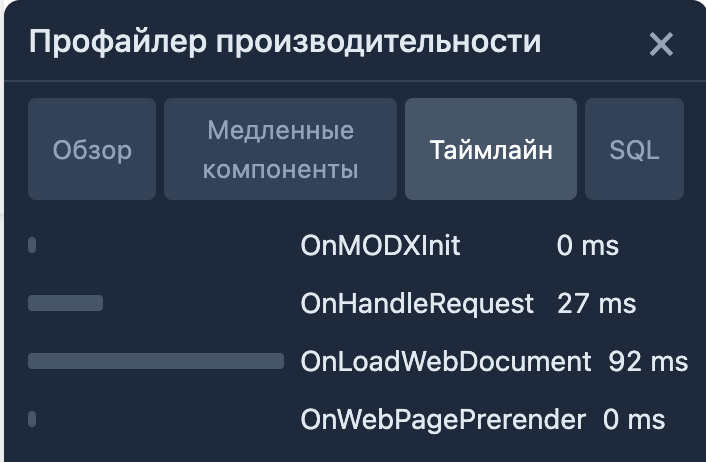
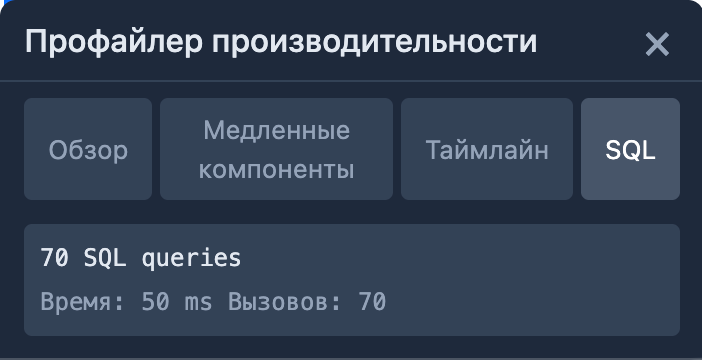
- Frontend Dev Toolbar — corner panel: time, memory, snippets, SQL; click to open Overview, Slow Components, Timeline, SQL. Localization (ru/en/uk).
- MODX Pipeline — tracks MODX events (OnHandleRequest, OnLoadWebDocument, OnWebPagePrerender), snippets, chunks, plugins, SQL.
- Advisor — optimization tips: uncached snippets, N+1, slow queries, chunk overuse.
- Production-safe — sampling (1–100%), toolbar only when logged into Manager; overhead < 5%.
Limitations
pdoTools 3.x: Fenom snippets and pdoTools snippets (msProducts, pdoResources, etc.) in MODX 3 are not profiled automatically. See limitations.
What works: MODX events, SQL, memory, total time, standard [[!Snippet]] tags (partially).
Quick start
- Install — install via Packages → Installer.
- Configure — Manage → System Settings, filter modx3profilertoolbar. Enable modx3profilertoolbar.enabled and modx3profilertoolbar.frontend_toolbar.
- Verify — open any site page while logged into Manager. The Dev Toolbar will appear in the bottom-right corner.
Requirements
- PHP 8.1+
- MODX Revolution 3.x
Changelog
All notable changes to this project will be documented in this file.
The format is based on Keep a Changelog.
[1.0.1-pl] - 2026-3-28
Fixed
- Обёртки сниппетов/чанков:
SnippetProcessWrapper/ChunkProcessWrapperнаследуютmodSnippet/modChunk, чтобы$modx->runSnippet()и$modx->getChunk()проходилиinstanceofв ядре MODX 3 (раньше возвращалась пустая строка).
[1.0.0-pl] - 2026-02-24
Added
- Modx3ProfilerToolbar: Frontend Dev Toolbar for MODX 3
- Frontend Dev Toolbar (Vue Petite): Overview, Slow Components, Timeline, SQL
- Advisor rules: UncachedSnippet, N1, SlowQuery, ChunkOveruse, TooManySnippets
- Localization: ru, en, uk
Notes
- No Manager UI, no trace storage, no debug report (toolbar-only addon)