

Free
Download the package from the manager of your site.
How to download?
How to download?

The author
Баха
Packages
6 Downloads
1 551 


FetchIt submits the forms of a site with the Fetch API: no page reload, no jQuery or other libraries. The forms are processed by FormIt, with all its hooks and validation, or by a snippet of your own. Every form is protected from spam from the start: a single-use token, a fill time, a trap field and a limit of submissions, and a proof of work and a captcha when you need them. One package installs on MODX 2.8 and on MODX 3.
The call must be uncached: every output of the form has a token of its own.
The component brings no ready-made form: all it takes is a chunk with attributes. data-error="name" gets the error of the field, the field itself gets aria-invalid and the class from a system setting, and data-success and data-validation-error get the message of the form.
The checks run before FormIt and before your snippet, both for FetchIt submissions and for a form sent without JavaScript.
A refusal comes as an ordinary error of the form: a message from the lexicon, the fetchit:error event and a notification. When the token of the page is stale — a page from a cache, a page open for long, a new key — FetchIt sends the form once more with a new token by itself, and the visitor notices nothing.
Both are off by default and help when spam gets through the main checks.
Proof of work. fetchit.protection.pow sets the difficulty in bits. The browser looks for a number whose SHA-256 of token:number starts with that many zero bits and sends it with the form. Solving starts as soon as the visitor enters the form, so the solution is usually ready by the time they press the button, while every submission costs a bot processor time. 16 bits are about 65 thousand hashes, about a third of a second on a computer; every bit doubles the time.
Captcha. Cloudflare Turnstile, Google reCAPTCHA v3 or Yandex SmartCaptcha, chosen with a setting, with the keys from the provider's dashboard. FetchIt adds the provider's script, gets its answer before sending and checks it on the server last among the checks, so bots without a token never reach the provider. When the provider is unavailable or does not accept the key, the form is refused with a message of its own and the cause is logged.
With FormIt the form is sent the usual way, and the messages and the values entered come back through its placeholders. The protection works here as well. The exceptions are the proof of work and the captcha: those need JavaScript.
With fetchit.frontend.default.notifier the answers of the server are shown as notifications in a corner of the page. The component pulls in no libraries of its own: the notifications are its own.
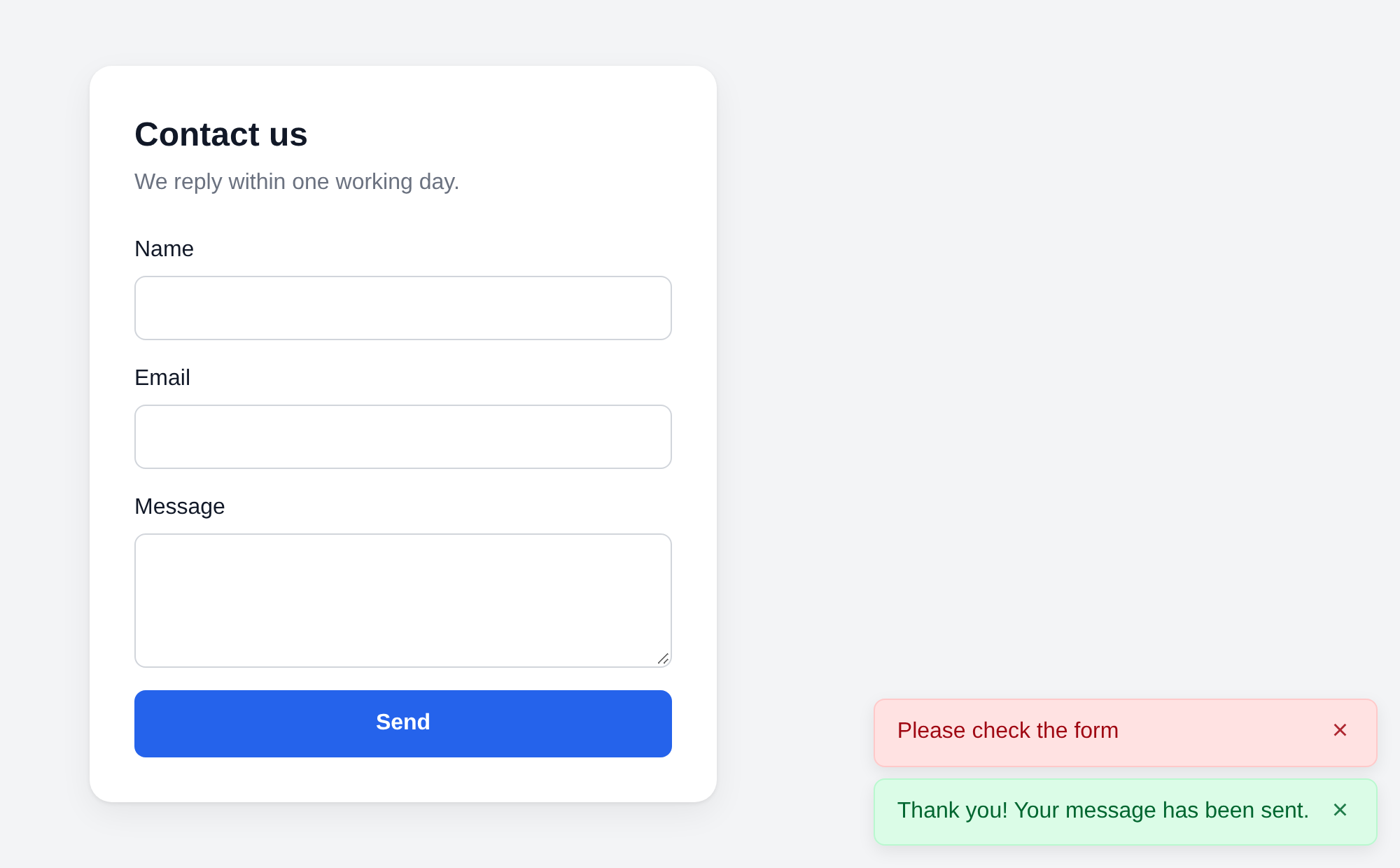
Screen readers hear them from two hidden live regions: an error at once, a success when the reader is idle. A notification closes with its button or by itself after six seconds, and the countdown stops while the pointer or the focus is on it. The colours are CSS variables, by default the pastel shades of Tailwind CSS 4 with a text contrast of about 6.5:1. When the site shows messages its own way, FetchIt.Message takes any library: Bootstrap, SweetAlert2, anything.
fetchit:before, fetchit:after, fetchit:success, fetchit:error and fetchit:reset are dispatched on document, with the form, its data and the answer of the server in detail. Any of them can be cancelled: add fields before sending, show a modal, send an event to analytics.
The script needs no jQuery or other libraries: the native Fetch API and FormData, files included. Minified it is 19 KB, about 7 KB over the network in gzip. It is loaded with defer and loads nothing else, except the script of the captcha provider when a captcha is on. A page can hold as many forms as you like, each with its own key and its own handler.
There used to be two: the 1.x line for MODX 2 and 3.x for MODX 3. FetchIt 4 installs over either of them, and the system settings and chunks stay as they are; the snippet calls on your pages need no changes. The API of the earlier versions works on both versions of MODX: FetchIt::service($modx), the FetchIt\FetchIt class, the earlier names of the methods.
What may affect your code: forms get the service fields of the protection, so a script of your own instead of the bundled one must send the token; the notifications no longer load Notyf; fetchit:error now fires on a failed request too. The full list is in the changelog and in the README on GitHub.
The snippet call
The call must be uncached: every output of the form has a token of its own.
[[!FetchIt?
  &form=`myForm.tpl`
  &hooks=`email`
  &emailTo=`info@example.com`
  &validate=`name:required,email:email:required`
  &successMessage=`Your message has been sent`
]]
The properties &hooks, &validate, &emailTo and the rest go to FormIt as they are, with no wrappers. Instead of FormIt you can name a snippet of your own: it gets the fields sent and answers through $FetchIt->success() or $FetchIt->error().
Your own markup
The component brings no ready-made form: all it takes is a chunk with attributes. data-error="name" gets the error of the field, the field itself gets aria-invalid and the class from a system setting, and data-success and data-validation-error get the message of the form.
<form action="[[~[[*id]]]]" method="post">
  <input type="email" name="email" value="[[+fi.email]]">
  <span data-error="email">[[+fi.error.email]]</span>
  <button type="submit">Send</button>
</form>
Chunks go through pdoTools, with Fenom and @FILE, on MODX 2 and MODX 3. A ready example, tpl.FetchIt.example, comes with the package.
Spam protection out of the box
The checks run before FormIt and before your snippet, both for FetchIt submissions and for a form sent without JavaScript.
- Token. The form gets a hidden field with a signature of the key of the form, the time it was output and a random number. A token is used once and needs no session. A new one is given only in answer to a well-signed token of the same form, so a bot cannot send the form without loading the page.
- Fill time. A form sent sooner than fetchit.protection.min_time seconds after the page was output (3 by default) is refused.
- Trap. A hidden field with a random name per installation: people do not see it and browser autofill does not recognise it. A bot that fills it gets a success answer, but the form is not processed and no email goes out.
- Limit. At most fetchit.protection.rate_limit submissions of a form from one address within fetchit.protection.rate_window seconds — 10 in 10 minutes by default. Every attempt with a well-signed token counts, refused ones too.
A refusal comes as an ordinary error of the form: a message from the lexicon, the fetchit:error event and a notification. When the token of the page is stale — a page from a cache, a page open for long, a new key — FetchIt sends the form once more with a new token by itself, and the visitor notices nothing.
Proof of work and captcha
Both are off by default and help when spam gets through the main checks.
Proof of work. fetchit.protection.pow sets the difficulty in bits. The browser looks for a number whose SHA-256 of token:number starts with that many zero bits and sends it with the form. Solving starts as soon as the visitor enters the form, so the solution is usually ready by the time they press the button, while every submission costs a bot processor time. 16 bits are about 65 thousand hashes, about a third of a second on a computer; every bit doubles the time.
Captcha. Cloudflare Turnstile, Google reCAPTCHA v3 or Yandex SmartCaptcha, chosen with a setting, with the keys from the provider's dashboard. FetchIt adds the provider's script, gets its answer before sending and checks it on the server last among the checks, so bots without a token never reach the provider. When the provider is unavailable or does not accept the key, the form is refused with a message of its own and the cause is logged.
It works without JavaScript too
With FormIt the form is sent the usual way, and the messages and the values entered come back through its placeholders. The protection works here as well. The exceptions are the proof of work and the captcha: those need JavaScript.
Notifications
With fetchit.frontend.default.notifier the answers of the server are shown as notifications in a corner of the page. The component pulls in no libraries of its own: the notifications are its own.
Screen readers hear them from two hidden live regions: an error at once, a success when the reader is idle. A notification closes with its button or by itself after six seconds, and the countdown stops while the pointer or the focus is on it. The colours are CSS variables, by default the pastel shades of Tailwind CSS 4 with a text contrast of about 6.5:1. When the site shows messages its own way, FetchIt.Message takes any library: Bootstrap, SweetAlert2, anything.
Events and TypeScript
fetchit:before, fetchit:after, fetchit:success, fetchit:error and fetchit:reset are dispatched on document, with the form, its data and the answer of the server in detail. Any of them can be cancelled: add fields before sending, show a modal, send an event to analytics.
document.addEventListener('fetchit:success', ({ detail }) => {
  gtag('event', 'form_submit', { form_id: detail.form.id })
})
The TypeScript types ship next to the script — fetchit.d.ts with the class, the instances of forms and the detail of every event. The script itself is type-checked against that same file, so the types and the code cannot drift apart.No dependencies
The script needs no jQuery or other libraries: the native Fetch API and FormData, files included. Minified it is 19 KB, about 7 KB over the network in gzip. It is loaded with defer and loads nothing else, except the script of the captcha provider when a captcha is on. A page can hold as many forms as you like, each with its own key and its own handler.
One package for MODX 2.8 and MODX 3
There used to be two: the 1.x line for MODX 2 and 3.x for MODX 3. FetchIt 4 installs over either of them, and the system settings and chunks stay as they are; the snippet calls on your pages need no changes. The API of the earlier versions works on both versions of MODX: FetchIt::service($modx), the FetchIt\FetchIt class, the earlier names of the methods.
What may affect your code: forms get the service fields of the protection, so a script of your own instead of the bundled one must send the token; the notifications no longer load Notyf; fetchit:error now fires on a failed request too. The full list is in the changelog and in the README on GitHub.
Changelog for FetchIt
All notable changes to this project are documented in this file. The format is based on Keep a Changelog, and the project adheres to Semantic Versioning.
FetchIt 1.x was the package for MODX 2 and FetchIt 3.x the package for MODX 3. FetchIt 4 replaces both with one package and installs over either of them.
4.0.0 - 2026-09-25
One package for MODX 2.8 and MODX 3, with spam protection on by default. It installs over FetchIt 1.x on MODX 2 and FetchIt 3.x on MODX 3; system settings and chunks are kept. What may affect your code is marked Breaking below and explained in the README, Upgrading to FetchIt 4.
Added
- Spam protection for every form, on by default, both for FetchIt submissions and for forms sent without JavaScript.
fetchit.protectionturns it all off.- A signed single-use token in every form (
fetchit_token), with no session needed. Only a request with a well-signed token of the form gets the next one, in theX-FetchIt-Tokenheader. When the token of a page is stale (a cached page, a page open for long, a new key), the script sends the form once more with the new token by itself. - A minimum fill time (
fetchit.protection.min_time, 3 seconds), counted from the first output of the page, resends included. - A hidden trap field with a random name per installation. A bot that fills it gets a fake success, and the form is not processed.
- A limit of submissions per form and client address (
fetchit.protection.rate_limit,fetchit.protection.rate_window), also behind trusted proxies and CDNs (fetchit.protection.proxies,fetchit.protection.ip_header). - Used tokens are marked atomically in
core/cache/fetchit/tokens/, which "Clear cache" leaves alone. When a mark cannot be written, the form is refused and the cause is logged. - An optional proof of work (
fetchit.protection.pow, in bits, off by default): the browser findsnsuch that SHA-256 oftoken:nstarts with that many zero bits, starting as soon as the visitor enters the form. When a page from a cache asks for less than the server, the refusal carriesX-FetchIt-Pow, and the script solves and sends once more. - Optional captchas: Cloudflare Turnstile, Google reCAPTCHA v3 and Yandex SmartCaptcha (
fetchit.captcha,fetchit.captcha.site_key,fetchit.captcha.secret_key,fetchit.captcha.min_score). FetchIt adds the provider's script, gets its answer before each submission and checks it on the server last. A provider that cannot be reached refuses the form with its own message,fetchit_err_captcha_unavailable; a captcha with no answer to send stops the submission withfetchit_err_captcha_client. - A log of refusals and problems (
fetchit.protection.log), and a signing key generated at install (fetchit.protection.secret). Mistakes in the settings of the captcha and the proof of work are logged.
- A signed single-use token in every form (
- The
OnFetchItBeforeProcessevent: a plugin gets$action,$fields,$propertiesand$FetchIt, and refuses a submission with$modx->event->output(). It fires with the protection off too. - MODX 3 support in the same package, built on MODX 2.8: it installs fresh on MODX 2.8 and MODX 3.
- The API of FetchIt 3.x on both versions: the
FetchIt\FetchItclass,saveActionProperties()andgetActionProperties(), and$modx->services->get('FetchIt')on MODX 3. FetchIt::service(), one shared instance on MODX 2 and MODX 3; the 1.x and 3.x ways to get FetchIt return the same instance.FetchIt::pdoTools(), which finds pdoTools 2 on MODX 2 and pdoTools 3 on MODX 3, for Fenom and@FILEchunks.FetchIt::prepareForm(), which gives the form tags of a chunk the POST method and the key of the form.- TypeScript types,
assets/components/fetchit/js/fetchit.d.ts:FetchIt, the config,FetchIt.Message, the instances of forms and thefetchit:*events with theirdetail. The script is type-checked against them. FetchIt.createNotifier(): the built-in notifications for a site that setsFetchIt.Messageitself.duration: 0keeps a notification until it is closed.detail.errorinfetchit:errorwhen a request fails, and thefetchit_err_requestlexicon entry the visitor sees then.- MODX log entries when the script cannot be added to a page with a form: no
`, or afetchit.frontend.jsthat is not a.js` file. - An upgrade with
fetchit.frontend.default.notifieron says in its log that Notyf is no longer loaded, and warns whenfetchit.frontend.jspoints to a script of the site.
Changed
- Breaking: forms get the service fields of the protection right after the form tag; they are removed from
$_POSTbefore FormIt reads them, so they never reach e-mails. A script of the site used instead of the bundled one must sendfetchit_tokenand take the next token from theX-FetchIt-Tokenheader of every answer. - Breaking: the notifications of
fetchit.frontend.default.notifierare FetchIt's own instead of Notyf, andwindow.Notyfis no longer loaded. Styles for.notyf__toastand scripts that callnew Notyf()need to change. The new notifications are accessible (live regions for screen readers, a labelled close button, focus handling), stay while hovered or focused, and take CSS variables for their colours, by default the pastel green and red of Tailwind CSS 4. Under a Content-Security-Policy they take the nonce of the FetchIt script. - Breaking:
fetchit:erroralso fires when a request fails, withdetail.responseset tonull. - Breaking: the processing snippet gets only the form sent in
fields:$_POST, and$_FILESfor FetchIt submissions. It used to get$_REQUEST, with GET values and, depending onrequest_order, cookies. - With the protection on, the snippet still runs FormIt on every page view, for its preHooks, but only a POST with a token of its form counts as a submission.
- The script is built with ES2019 syntax, so it runs in every browser of the project's browserslist.
- The hooks of
FetchIt.Messageand the events get a stringmessageand an objectdataeven when the processing snippet left them out. An exception in a hook is logged with its name and no longer keeps the answer from the form. fetchit:successcan be cancelled:event.preventDefault()keeps the fields filled.- A second submission while a request is running is ignored.
- On MODX 3 the plugin and
action.phptake FetchIt from the service container instead of the deprecatedgetService(). - The inline
FetchIt.create()call checks that the class offetchit.frontend.js.classnameis loaded, so a page without the script falls back to a normal submission instead of throwing.FetchIt.create()warns in the console when no form matches. methodanddata-fetchitcome last among the attributes of the form tag, and the?v=of the script URL keeps its query string and fragment.
Removed
lib/notyf.min.jsandlib/notyf.min.cssare no longer shipped. An upgrade leaves the old copies in place.
Fixed
- A form sent without JavaScript never showed its success or error message when the chunk used output filters on the FormIt placeholders, like the example chunk: the chunk was rendered before FormIt ran.
- A form tag with its own
data-fetchitcame out broken, look-alike tags such as` were changed, and so were theformmethodanddata-fetchit` of elements inside the form. Form tags are now parsed one by one, quoted values included. - The script was not added on sites without anonymous sessions, and when `` was written in capitals or had attributes.
- FormIt was not installed together with FetchIt on MODX 3. The installer now also reports each way the download or install of FormIt can fail.
- Two identical snippet calls on one page bound the form twice, and it was sent twice.
- Fields disabled in the markup became enabled after a submission.
- A network error, or an answer that is not FetchIt's (a PHP error page, HTML after a redirect, JSON from a firewall), was only logged to the console. The visitor now sees
fetchit_err_request. - A FormIt error placeholder holding only
- Field names with quotes broke the error selectors.
- A snippet property set that does not exist made
action.phpfail on PHP 8. The snippet now runs without it, and the MODX log names the missing set. - Without the
fetchit.frontend.jssetting the plugin linked the missingjs/default.js. - PHP 8.1 deprecation notices when the invalid-class settings are missing.
Security
- A POST straight to the URL of a page with a FetchIt form reached FormIt and its hooks, e-mails included, without any check. It now has to carry a valid token of the form.
- FormIt 5.2 and later kept the properties of every FetchIt form, hooks included, for its own
action.php, which processes a form without FetchIt's checks. FetchIt now turns that AJAX mode off for its forms: it removes the stored properties, theajaxTokenplaceholder andformit.js. FormIt forms of their own on the same page keep their AJAX mode.
3.1.4 - 2026-09-09
Fixed
- The success and validation messages of the form were not shown on AJAX submissions. They now go to the
[data-success]and[data-validation-error]elements of the form (#15). - FormIt field errors of only whitespace marked the form as failed (#14).
- A PHP 8 warning for the undefined
$_SESSION['fetchit_called'](#13), and for the undefined$_SESSION['FetchIt']. - A GET request to
action.phpwas not redirected. - The
successMessageof the snippet call was not used in the AJAX answer of FormIt.
Changed
- The frontend is built with Rollup 4.
3.1.3 - 2026-07-21
Fixed
- The fatal error
Serialization of 'PDO' is not allowedon MODX 3.2.2 and PHP 8.3 (#17, #18). The properties of a form no longer hold the FetchIt instance: custom snippets get it with$modx->services->get('FetchIt').
3.1.2 - 2023-11-11
Added
- The reCAPTCHA v3 error of FormIt is returned as the error of the
recaptchafield (#6).
Fixed
action.phpcould not findconfig.core.phpwhen the document root is not the root of MODX (#4).
3.1.1 - 2023-07-14
Fixed
- A fatal error on PHP 8 when the script was added to the page.
3.1.0 - 2023-06-12
Added
- The
fetchit.frontend.default.notifiersetting: the answers are also shown as Notyf notifications.
3.0.0 - 2023-06-06
Added
- The package for MODX 3, based on FetchIt 1.0.1.
1.1.3 - 2026-08-12
Fixed
- The fatal error
Serialization of 'PDO' is not allowedon PHP 8.3 (#17). The properties of a form no longer hold the FetchIt instance: custom snippets get it with$modx->getService('fetchit', 'FetchIt', MODX_CORE_PATH . 'components/fetchit/model/'). - The success and validation messages of the form were not shown on AJAX submissions (#11, #15). They now go to the
[data-success]and[data-validation-error]elements of the form; custom chunks need these attributes instead of[[+fi.success:…]]conditions. - FormIt field errors of only whitespace marked the form as failed (#10, #14).
- A PHP 8 warning for the undefined
$_SESSION['fetchit_called'](#7, #9, #13), and for the undefined$_SESSION['FetchIt']. - A GET request to
action.phpwas not redirected. - The
successMessageof the snippet call was not used in the AJAX answer of FormIt (#5).
1.1.2 - 2023-11-11
Added
- The reCAPTCHA v3 error of FormIt is returned as the error of the
recaptchafield (#6).
1.1.1 - 2023-07-14
Fixed
- A fatal error on PHP 8 when the script was added to the page.
1.1.0 - 2023-06-12
Added
- The
fetchit.frontend.default.notifiersetting: the answers are also shown as Notyf notifications.
1.0.1 - 2023-03-25
Fixed
- The script was missing when the snippet was called from Fenom. A plugin on
OnWebPagePrerendernow adds it to ``.
1.0.0 - 2023-03-20
Fixed
- The undefined variable
$hash.
1.0.0-beta - 2023-02-23
Added
- The first release: forms sent with the Fetch API and processed by FormIt or a snippet of your own.