

Free
Download the package from the manager of your site.
How to download?
How to download?

The author
Баха
Packages
6 Downloads
1 596 


Hosting plans and maintenance contracts come with a space limit, and a site grows quietly: full-size images, archives of old package versions, logs, a backup someone left in the root. By the time the space runs out, finding where it went means SSH.
modSizeControl walks every file of the site once and remembers what weighs what. From then on, «where did the space go» is answered in the manager, with no console.
The component has been rewritten from scratch: its own page with six tabs, stepped scanning, cleanup and a new widget. The system setting keys are unchanged, so a limit set by the old version keeps working.
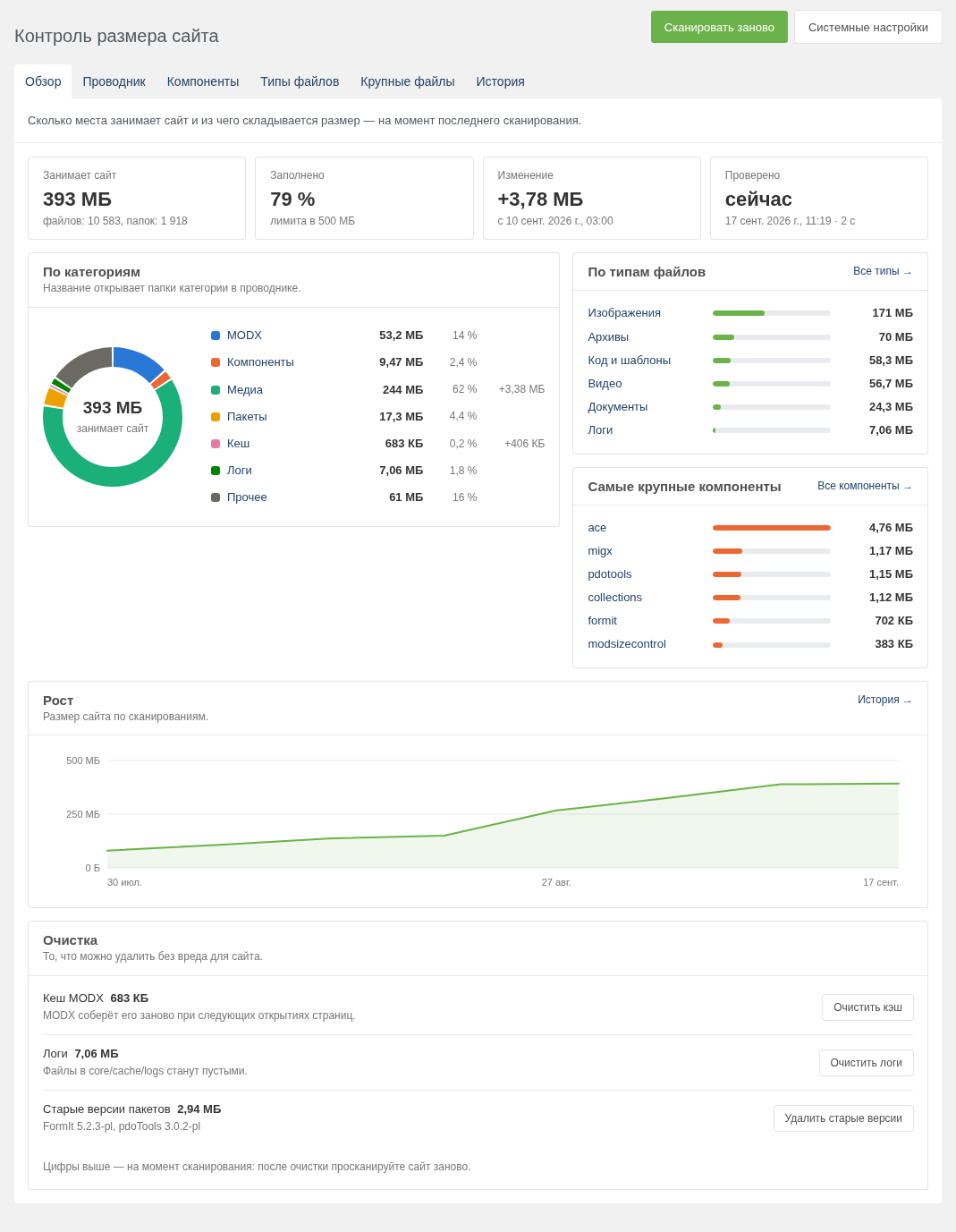
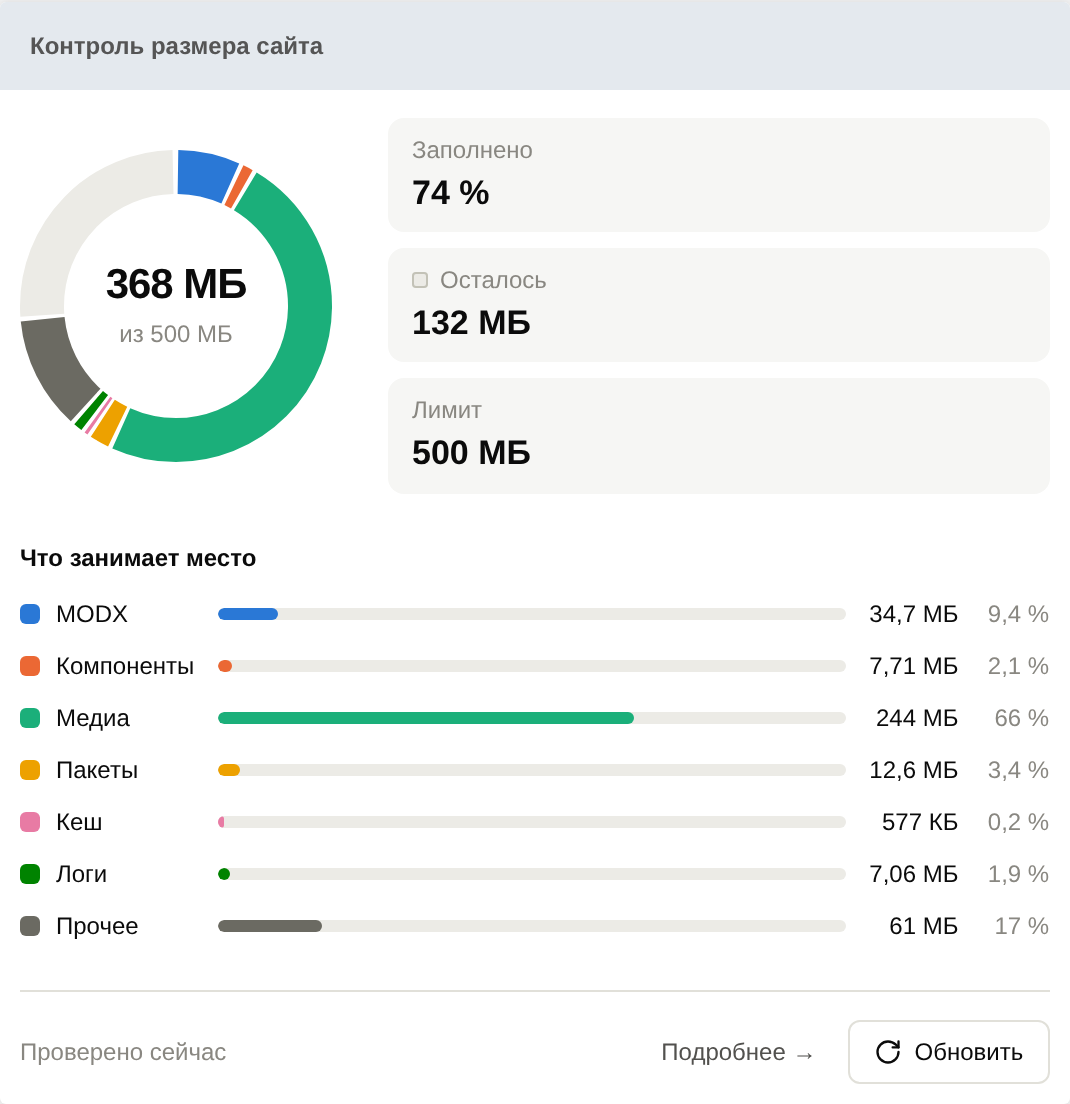
The ring is the limit, the slices are categories: MODX, extras, media, packages, cache, logs and the rest. What is left before the limit is the empty sector. Next to it, cards for «Used», «Left» and «Limit»; below, the same categories as a list. Hovering a slice or a row highlights both.
With no limit set — the default — the widget compares the site's size with free space on the disk. And if the disk has less free space than the limit leaves you, it warns about that too: a 10 GB limit on a disk with 2 GB free is not much of a limit.
«Refresh» scans the site right in the widget; «Details» opens the component page.
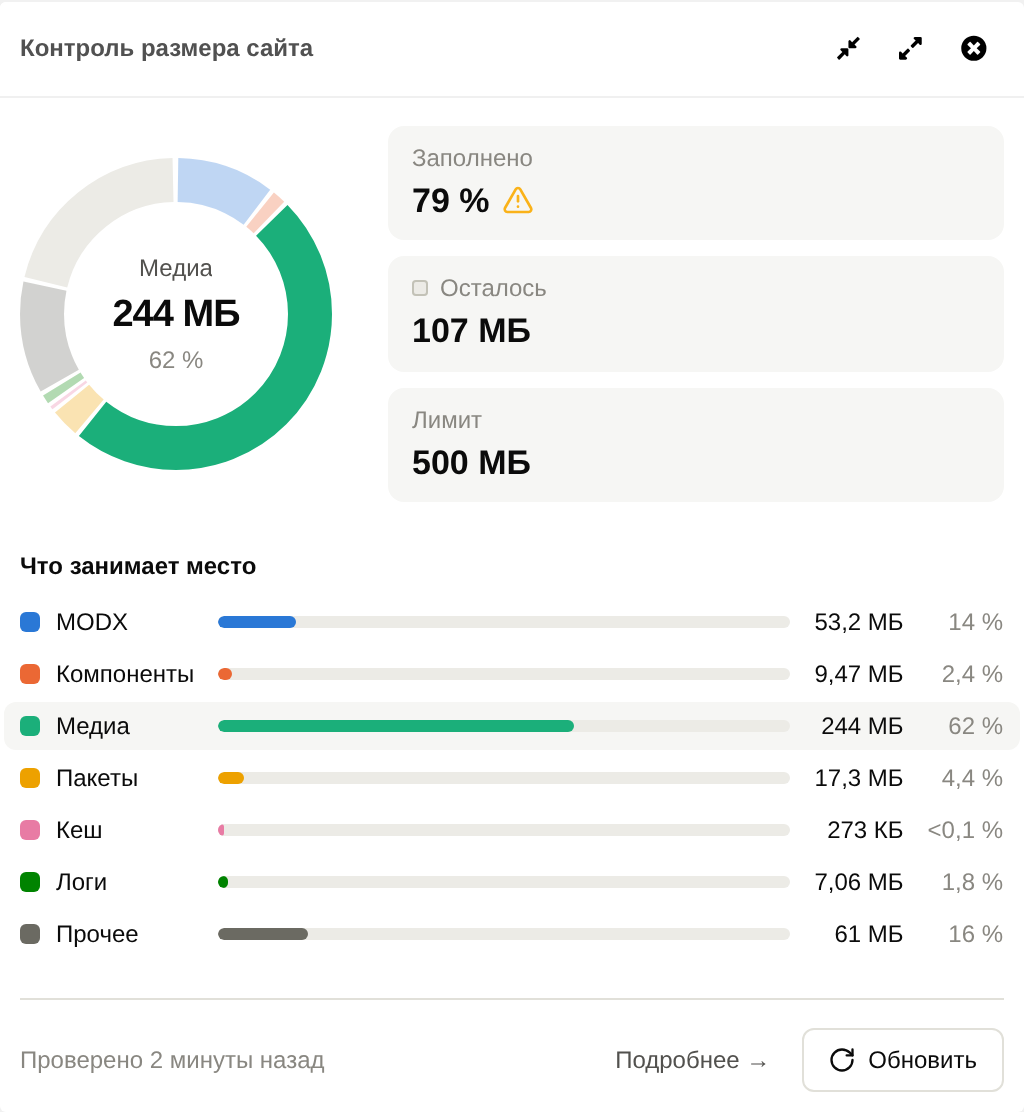
Overview puts it all on one screen: the site's size, how full it is, how much it grew since the last scan, a pie by category, file types, the largest extras, a growth chart and the cleanup panel.
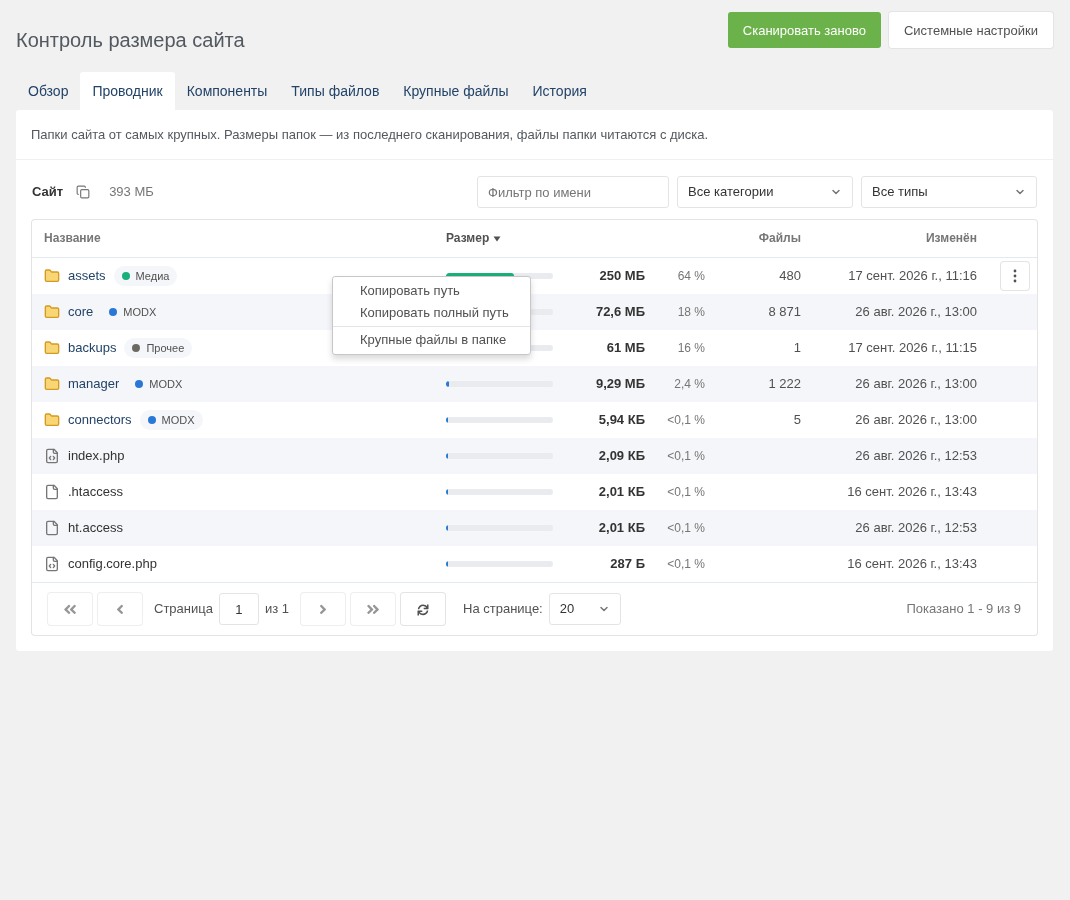
Explorer lists the site's folders, largest first. A folder belonging to another category is labelled, and the file-type filter recalculates sizes for that type only — which is how you find where the videos a content manager uploaded «temporarily» three years ago actually live. Rows have a menu, by button or right-click just like a MODX grid: copy the path from the site root or the full server path, open the file in the browser, show the folder's largest files.
Extras shows how much each one takes in core/components and assets/components, with the installed package version.
File types shows what the size is made of, with «Where they live» and «Largest files» buttons.
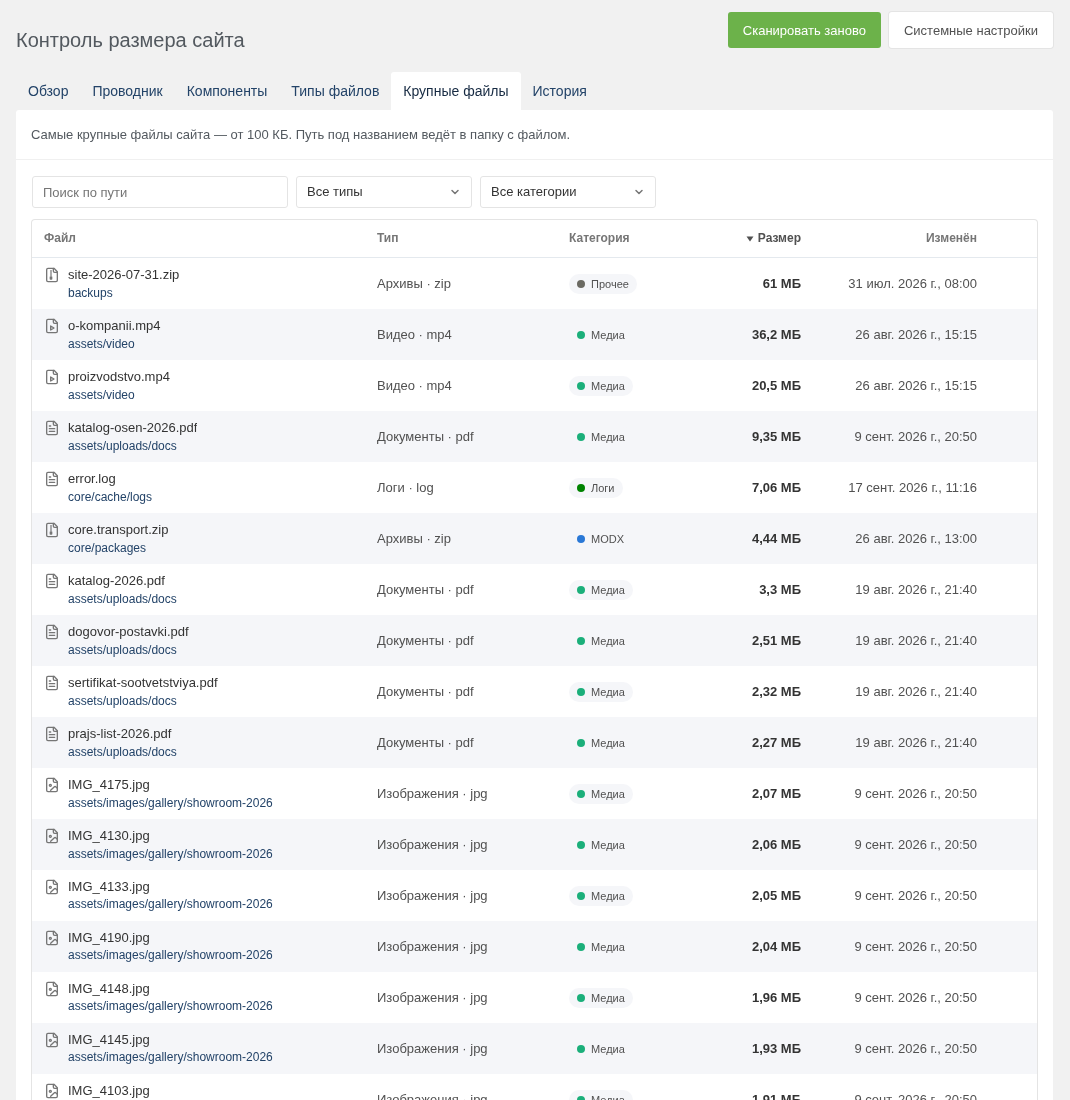
Largest files lists everything from 100 KB up, with a path search.
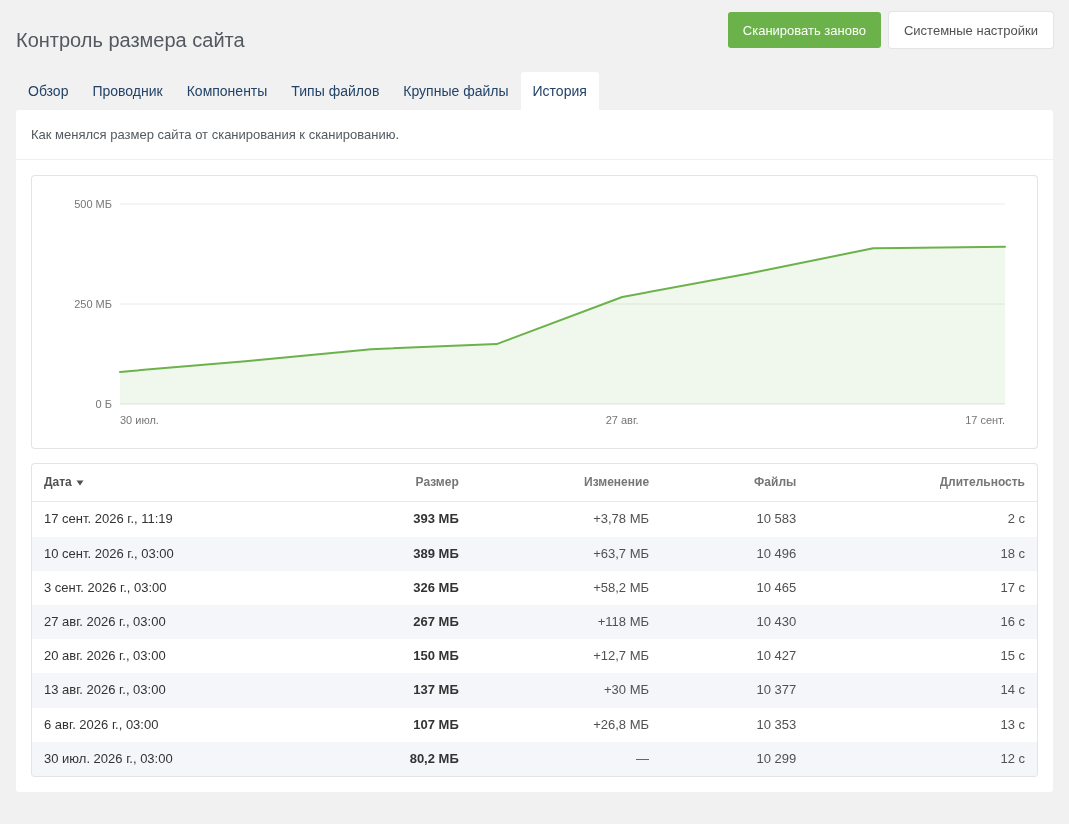
History keeps the totals of the last 500 scans. Put the scan in cron, and a couple of months later you can see which week the site suddenly gained a hundred megabytes.
The tab, the folder and the filters live in the page URL: they survive a reload, the link can be shared, and the browser's Back returns to the previous folder.
On a site with tens of thousands of files, measuring the size on the fly is slow — and breaking it down by folder and type means visiting every file anyway. So the scan runs in steps of a few seconds through the manager connector: a large site never hits max_execution_time, and an interrupted scan resumes from where it stopped. You can close the page — the scan continues when you open it again. Two windows never walk the same folders.
It covers not just the site root but whatever MODX keeps outside it: a relocated core, assets, manager, connectors and media sources. Categories are derived from MODX constants, so a renamed core is recognised too.
There is a cron script:
At the bottom of Overview sits what can be deleted without harming the site: the MODX cache, logs in core/cache/logs, and old package versions. That last one is the satisfying part: archives of previous versions pile up in core/packages after every update, and on a site maintained for a couple of years that is tens of megabytes.
Every action is confirmed and uses the stock permissions: empty_cache, error_log_erase and packages. Old versions are removed by the same MODX processor that sits behind the Remove button in the package versions window, and only below the installed version.
With a limit set, a file that does not fit will not upload through the file manager. The size is not re-measured on every upload — it is the last scan plus everything uploaded since. Enabled with the modsizecontrol_control setting, off by default.
pdoTools and Ace are no longer required. MODX 2 and MODX 3 ship in one package, and the interface looks like a native part of the manager in both.
The installer removes what the old version left behind: the assets/components/modsizecontrol/action.php file and the modsizecontrol_tpl setting. The tpl.modSizeControl chunk is no longer used and can be deleted.
modSizeControl walks every file of the site once and remembers what weighs what. From then on, «where did the space go» is answered in the manager, with no console.
The component has been rewritten from scratch: its own page with six tabs, stepped scanning, cleanup and a new widget. The system setting keys are unchanged, so a limit set by the old version keeps working.
Dashboard widget
The ring is the limit, the slices are categories: MODX, extras, media, packages, cache, logs and the rest. What is left before the limit is the empty sector. Next to it, cards for «Used», «Left» and «Limit»; below, the same categories as a list. Hovering a slice or a row highlights both.
With no limit set — the default — the widget compares the site's size with free space on the disk. And if the disk has less free space than the limit leaves you, it warns about that too: a 10 GB limit on a disk with 2 GB free is not much of a limit.
«Refresh» scans the site right in the widget; «Details» opens the component page.
Component page
Overview puts it all on one screen: the site's size, how full it is, how much it grew since the last scan, a pie by category, file types, the largest extras, a growth chart and the cleanup panel.
Explorer lists the site's folders, largest first. A folder belonging to another category is labelled, and the file-type filter recalculates sizes for that type only — which is how you find where the videos a content manager uploaded «temporarily» three years ago actually live. Rows have a menu, by button or right-click just like a MODX grid: copy the path from the site root or the full server path, open the file in the browser, show the folder's largest files.
Extras shows how much each one takes in core/components and assets/components, with the installed package version.
File types shows what the size is made of, with «Where they live» and «Largest files» buttons.
Largest files lists everything from 100 KB up, with a path search.
History keeps the totals of the last 500 scans. Put the scan in cron, and a couple of months later you can see which week the site suddenly gained a hundred megabytes.
The tab, the folder and the filters live in the page URL: they survive a reload, the link can be shared, and the browser's Back returns to the previous folder.
Stepped scanning
On a site with tens of thousands of files, measuring the size on the fly is slow — and breaking it down by folder and type means visiting every file anyway. So the scan runs in steps of a few seconds through the manager connector: a large site never hits max_execution_time, and an interrupted scan resumes from where it stopped. You can close the page — the scan continues when you open it again. Two windows never walk the same folders.
It covers not just the site root but whatever MODX keeps outside it: a relocated core, assets, manager, connectors and media sources. Categories are derived from MODX constants, so a renamed core is recognised too.
There is a cron script:
0 3 * * * php /var/www/site/core/components/modsizecontrol/cli/scan.php > /dev/null 2>&1If a manager-started scan is running at that moment, the script continues it instead of starting a second one.
Cleanup
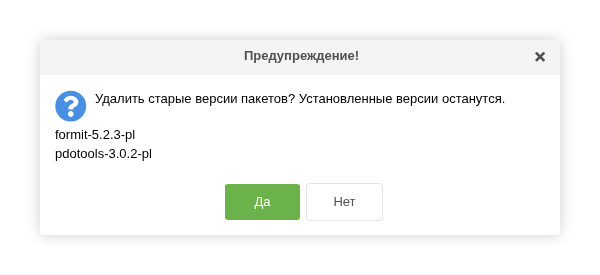
At the bottom of Overview sits what can be deleted without harming the site: the MODX cache, logs in core/cache/logs, and old package versions. That last one is the satisfying part: archives of previous versions pile up in core/packages after every update, and on a site maintained for a couple of years that is tens of megabytes.
Every action is confirmed and uses the stock permissions: empty_cache, error_log_erase and packages. Old versions are removed by the same MODX processor that sits behind the Remove button in the package versions window, and only below the installed version.
Upload control
With a limit set, a file that does not fit will not upload through the file manager. The size is not re-measured on every upload — it is the last scan plus everything uploaded since. Enabled with the modsizecontrol_control setting, off by default.
No dependencies
pdoTools and Ace are no longer required. MODX 2 and MODX 3 ship in one package, and the interface looks like a native part of the manager in both.
Upgrading from 1.0.x
The installer removes what the old version left behind: the assets/components/modsizecontrol/action.php file and the modsizecontrol_tpl setting. The tpl.modSizeControl chunk is no longer used and can be deleted.
2.0.1-pl
- Upload control no longer breaks uploads: with a limit set, every file that fit the limit failed with a PHP fatal error, and the manager's uploader showed "unknown".
- Only files the file manager actually wrote count as uploaded. A file MODX turns down by its extension, upload_maxsize or an existing name no longer makes the site look bigger until the next scan.
- Deleted files free room for uploads again: when an upload would not fit after files were changed or deleted, the site is measured again before the file is refused.
2.0.0-pl
- Rewritten from scratch. The system setting keys are unchanged, so a limit set by the old version keeps working.
- A component page of its own (Extras -> modSizeControl, the settings permission) with six tabs: Overview, Explorer, Extras, File types, Largest files and History. The tab, the folder and the filters live in the page URL, so they survive a reload and the browser's Back returns to the previous folder.
- Stepped scanning through the manager connector: a large site no longer hits max_execution_time, an interrupted scan resumes where it stopped, and two windows never walk the same folders. Whatever MODX keeps outside the site root is covered too: a relocated core, assets, manager, connectors and media sources.
- Scanning from cron: core/components/modsizecontrol/cli/scan.php. It continues a scan started in the manager instead of starting a second one.
- Cleanup with confirmation and the stock permissions: the MODX cache (empty_cache), the logs in core/cache/logs (error_log_erase) and old package versions (packages), removed by the same core processor as the manager's own button and only below the installed version.
- The dashboard widget was rewritten: the ring is the limit, the slices are categories, and with no limit set the widget compares the site against free space on the disk and warns when the disk has less of it than the limit leaves. The widget places itself on the dashboard on first install.
- Upload control no longer measures the site on every upload: it takes the last scan plus everything uploaded since.
- pdoTools and Ace are no longer required. MODX 2 and MODX 3 install from one package.
- The world-readable assets/components/modsizecontrol/action.php, through which anyone could start a full scan of the site, is gone; a resolver removes it and the unused modsizecontrol_tpl setting on upgrade. The tpl.modSizeControl chunk is no longer used and can be deleted.
1.0.8-beta
- Change main plugin
- Update format_size method
- Added checkSize, getAvailable & getSiteSize methods
1.0.7-beta
- Added feature that controls file downloads, which interrupt file uploads when the limit is reached. (Disabled by default, System setting: modsizecontrol_control)
- Fixed undefined instead of percentage during first loading
- Minor design changes
1.0.6-beta
- Fix size limit exceeded behavior
1.0.5-beta
- Fixed error "Cannot read property classList" was on all pages except the main
- Fixed infinite scrolling behavior after error
1.0.4-beta
- Added protection update
- Added detection of free disk space
- Remove setting site_size
- Added caching for 12 hours
1.0.3-beta
- Refactor update size
1.0.2-beta
- Remove init pdoTools from processor
- Added tpl setting
1.0.1-beta
- Refactoring js
- size/update processor
- Refactoring php
1.0.0-beta
- First Init