

- Checked by Modstore
- Free future updates
- Work on the test and public domain
- 12 months tech. support


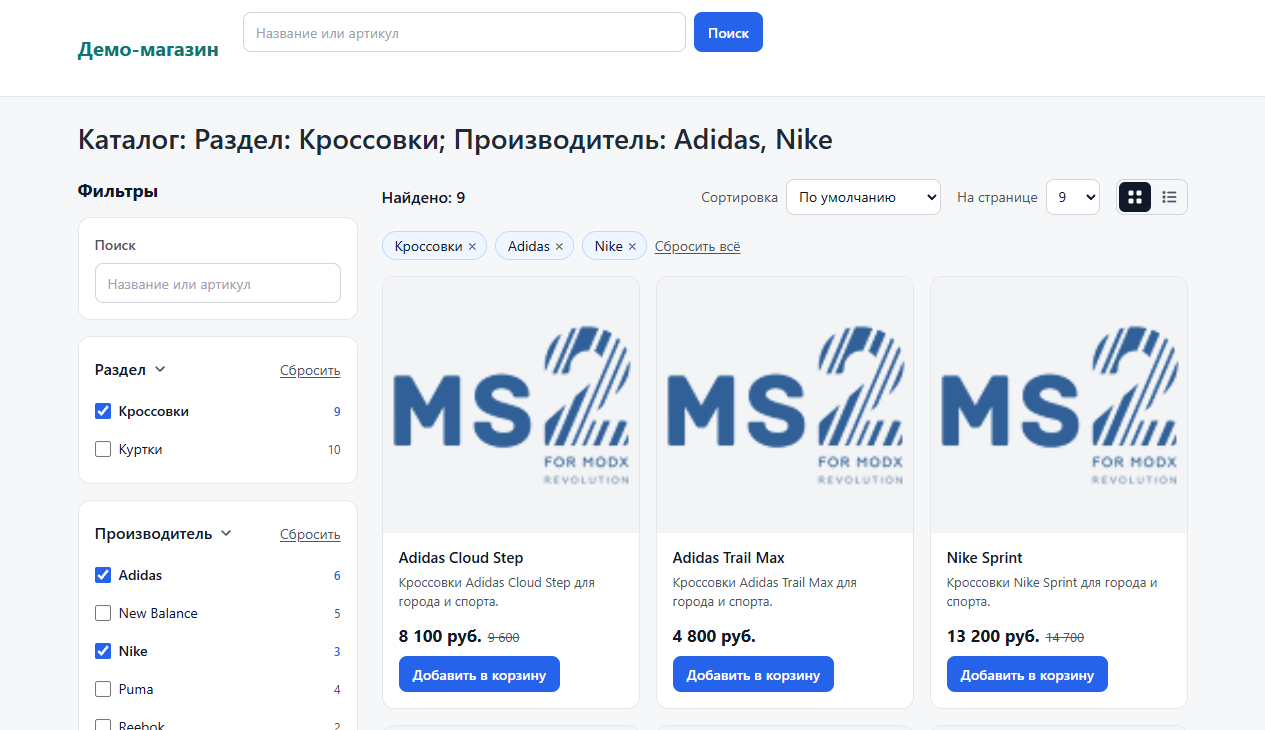
msCatalyst runs the whole miniShop2 and MiniShop3 catalog. It loads and updates products from 1C, Google Sheets, CSV, XLSX and any API, and shows them on the site with a faceted filter and live search. One package installs on MODX 2.8 and MODX 3. The filter is built for large shops: on 100,000 products it recounts the results and every counter in 10–40 ms.
Demo: chelnysite.ru, a catalog of 100,000 products in 12 sections on ordinary shared hosting. You can open the component's manager page without a MODX login: chelnysite.ru/admin-demo. All tabs work there, including the sync wizard with three ready profiles. The demo interface is in Russian.
What you get
- Catalog sync instead of a one-off import. msCatalyst remembers which site product matches which source row. It updates only what changed, runs on a schedule and creates no duplicates.
- You see everything before it is written. Source analysis, field mapping, catalogs side by side and a change plan «was → becomes». Only an approved schema writes to the site, and you can roll back any run with one button.
- 100,000 products without lag. After a click the shopper sees the new list in 120–250 ms. The index keeps a bitmask per filter value, so msCatalyst never scans products in the database.
- Search that forgives typos. Word forms, typos and transliteration are handled. You don't need phpMorphy on the server.
- The Back button returns to the previous results. A shopper pages 1, 2, 3, presses Back and sees page 2 with the same filters.
- One package for MODX 2 and MODX 3. When you move the site to MODX 3 with MiniShop3, the catalog moves with it. Snippet calls and chunks stay the same.
Sync
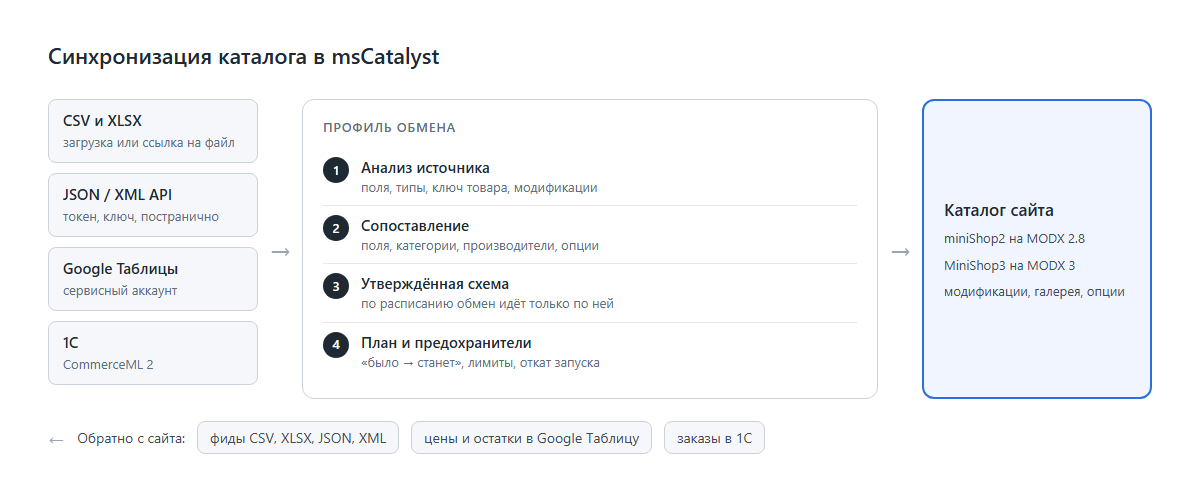
A profile sets up one exchange: source, direction, field mapping, product key and schedule. You can have several profiles. For example, supplier prices come from an API and stock comes from a Google Sheet.
- CSV and XLSX. Upload in the manager or a link to the file. msCatalyst detects the delimiter and the encoding (UTF-8 or Windows-1251). XLSX is read row by row, with no third-party libraries.
- JSON or XML API. URL, headers, Bearer, Basic or key authorization. Paging by page number, offset, cursor or next-page link.
- Google Sheets both ways. msCatalyst reads the sheet and writes back prices, stock and new products from the site.
- 1C via CommerceML 2. Groups, properties, characteristics, prices and stock. Orders go to 1C, statuses come back to the site.
- Export feeds. A tokenized URL serves the section's products with modifications as CSV, XLSX, JSON or XML.
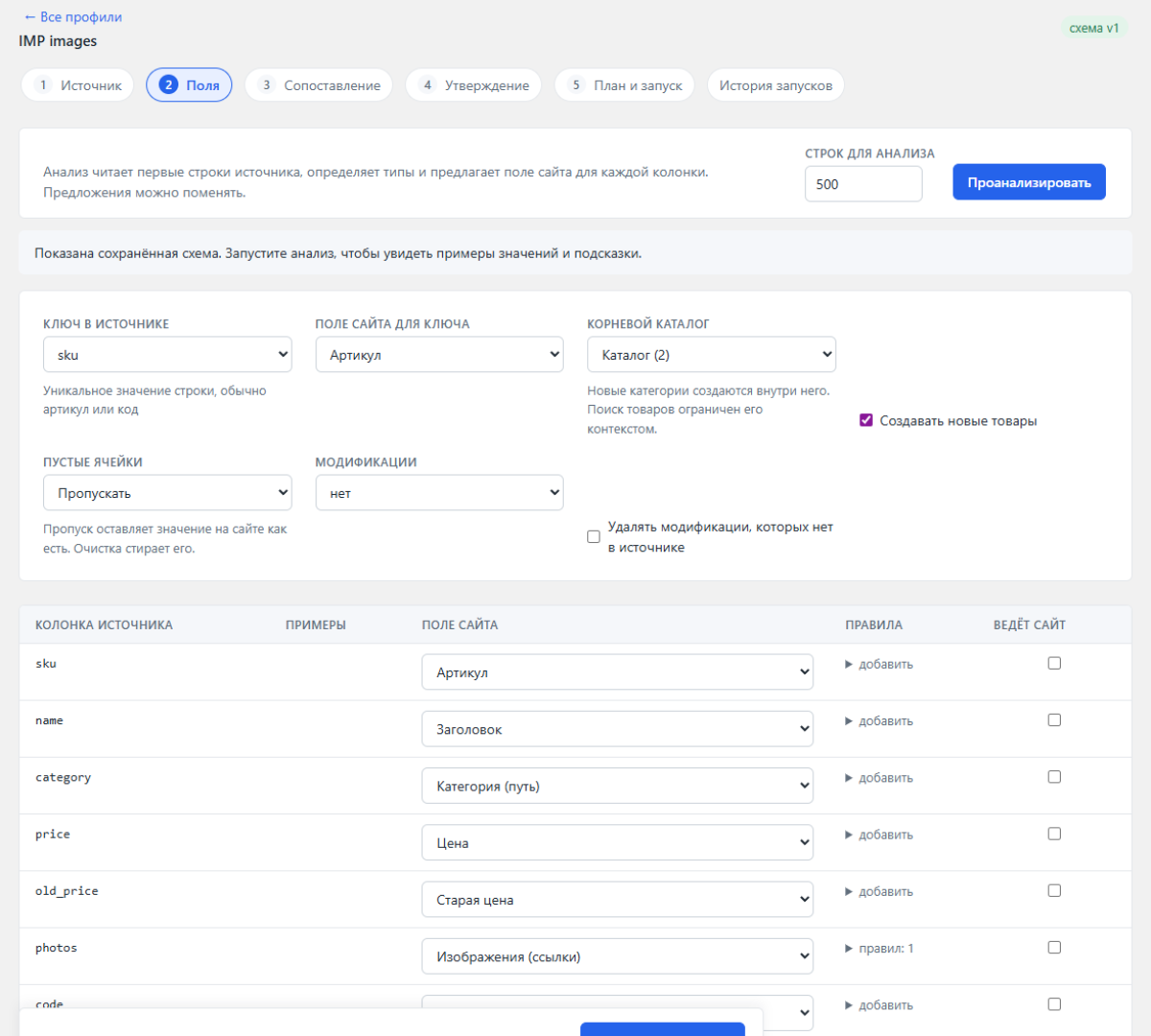
For each source column msCatalyst suggests a site field with a confidence score. When nothing matches, it creates an option of the right type and binds it to the product categories. Rules clean text, split lists, turn yes/no into a checkbox, add a markup and round prices.
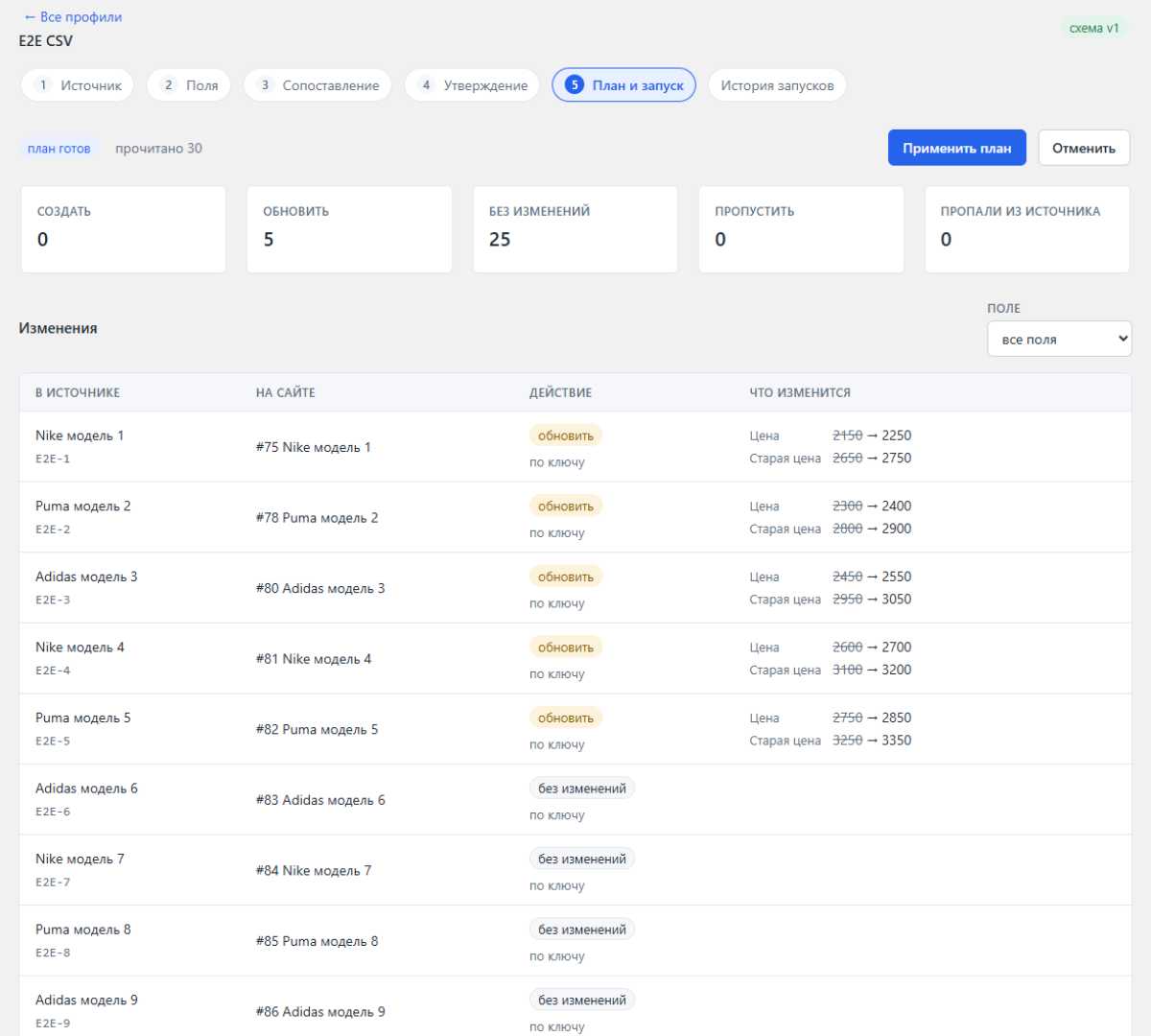
Before writing you see how many products msCatalyst will create, update and unpublish, and each field as «was → becomes». Guards stop the exchange when too many products would be unpublished, a price jumps beyond the set percentage or the source returns far fewer rows. The manager gets an email with a link to the right screen.
An import that survives real price lists
- Any key you choose. Article, any product or resource field, an option, a TV or the ID. The first import over an existing catalog finds products by the key instead of creating copies.
- Categories, vendors and options are created for you. «Shoes > Sneakers» and «shoes/sneakers» end up in one category.
- Images from any address. Full links, paths relative to the supplier URL or to a folder on the site. msCatalyst checks that the link returns an image and not an error page. It won't load the same picture twice under a new URL. A failed image goes to the run errors with the reason, and the next exchange retries it.
- Empty cells don't erase data. msCatalyst skips them by default. You can turn on clearing for the whole profile or for one field, such as the old price.
- Modifications. msCatalyst writes them to msOptionsPrice2 on MODX 2 and to ms3Variants on MODX 3.
- Your edits stay yours. The «Site owns» flag fills a field only on new products. For products missing from the source you pick the action: unpublish, zero the stock, mark deleted or leave them.
Filter
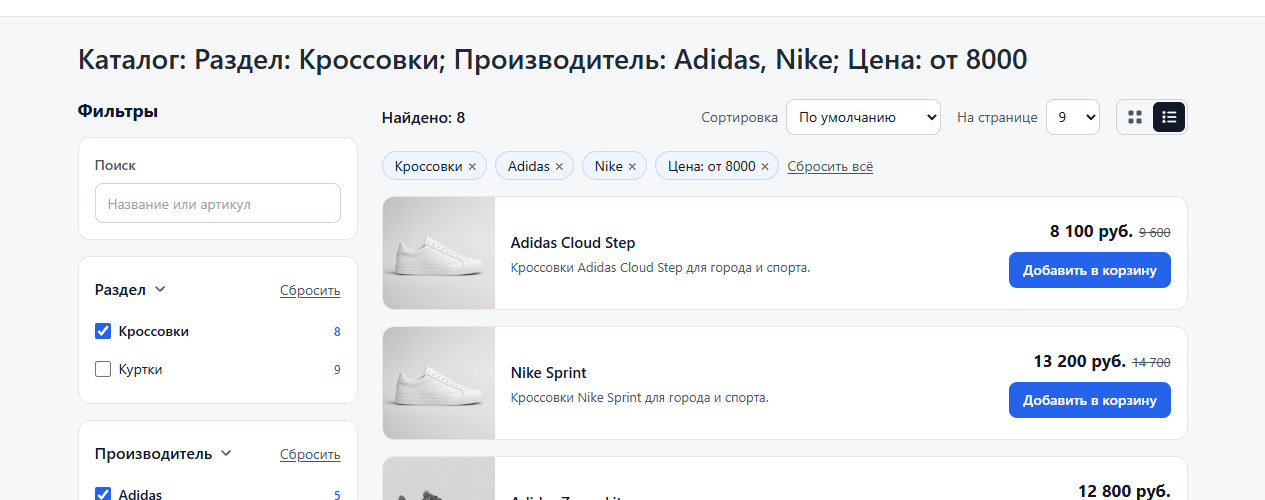
- Facets by vendor, section, product fields, options, TVs and resource fields.
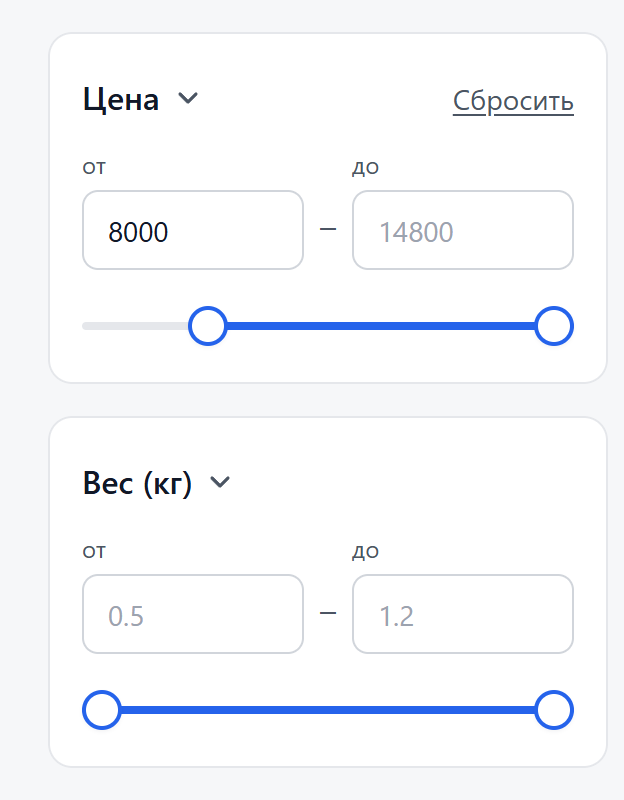
- Price, weight and any numeric field with a slider or «from» and «to» inputs.
- Each value shows its product count, and the counts update after every choice.
- Selected filters appear above the catalog, each with a remove button.
- The price filter uses modification prices, and facets show modification options.
- Without JavaScript the filter works as a plain form with real pagination links.
- title, H1 and description with the selected filters arrive in the first HTML. Friendly filter URLs, a sitemap and a SeoFilter bridge are included.
Search
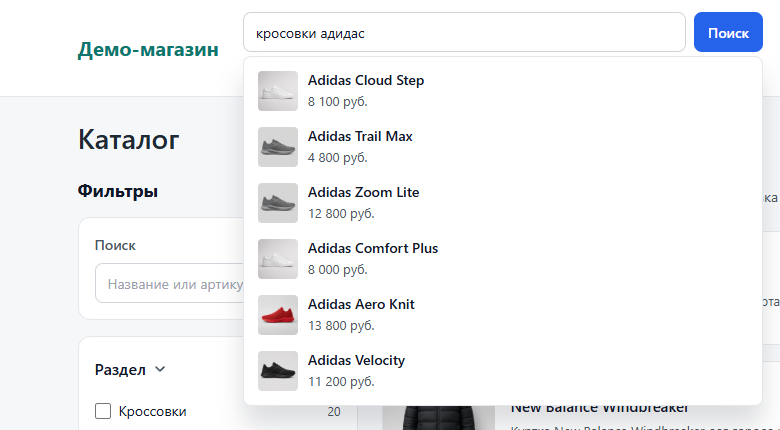
- Four modes: search inside the catalog, a results page, a dropdown, or a dropdown together with the page.
- Field weights are configurable: a match in the article or title ranks above a match in the description.
- You keep synonyms in a table in the manager.
Speed on 100,000 products
- The filter recounts results and all counters in 10–40 ms on the server.
- Search over the whole catalog answers in 100–150 ms, live suggestions in 50–100 ms.
- The index weighs 4.7 MB and loads in 5 ms. A full build takes about 10 seconds in chunks of 2,000 products and fits in 100 MB of memory.
- You can see the timing on your own site: the Server-Timing header and the mscatalyst.ms and mscatalyst.items placeholders.
Manager page
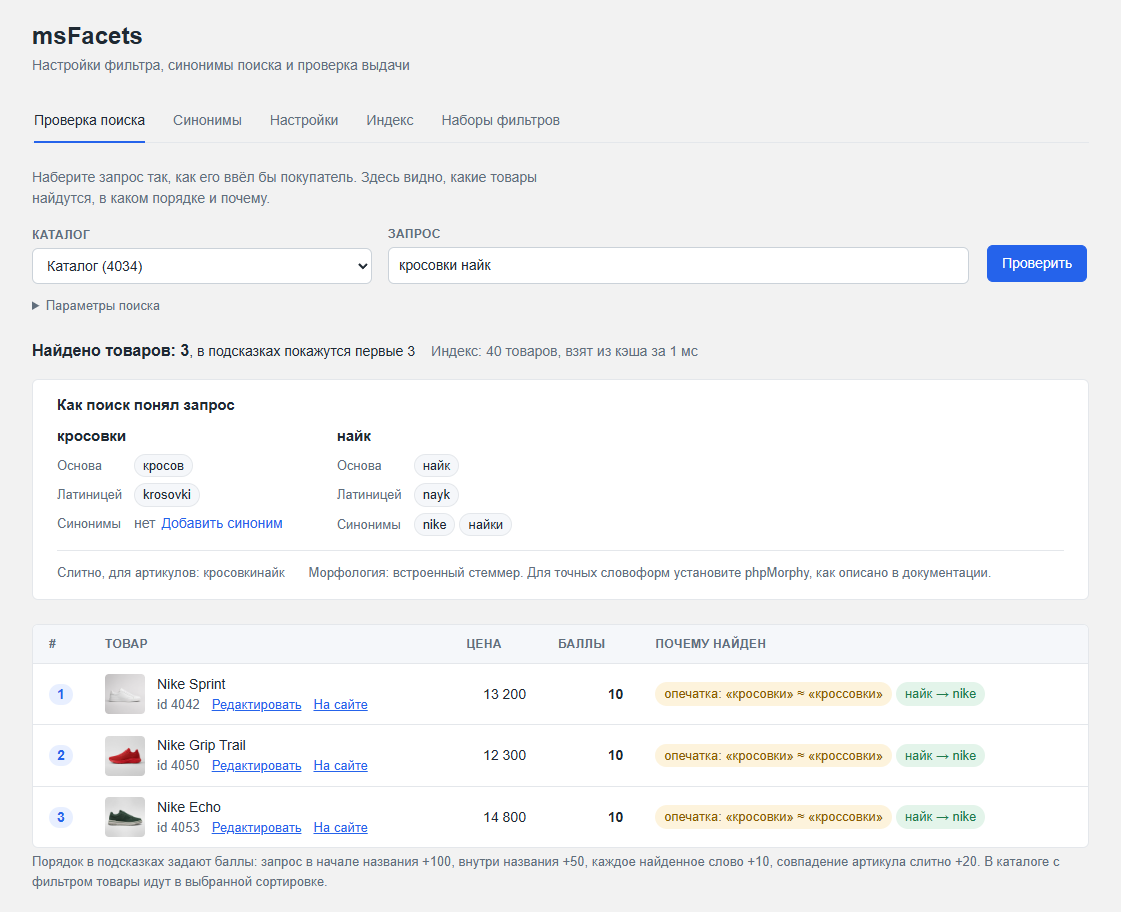
Under Extras you get an msCatalyst page with six tabs: search tester, synonyms, settings, index, filter sets and sync. The search tester shows which products a query finds, in what order and why. The manager page is translated into English.
For developers
- Snippets msCatalyst, msCatalystSearch and msCatalystSync for cron. Eight chunks, each replaceable.
- Styling on CSS variables, JS events and a REST endpoint for your own frontend.
- If you have msFacets, install msCatalyst over it. It moves settings, synonyms and filter sets, and old [[!msFacets]] calls keep working.
- PHP 7.2 to 8.4. Before each release the package passes over 2,000 automated tests on PHP 7.2, 7.4 and 8.4.
Requirements: MODX 2.8 with miniShop2 or MODX 3 with MiniShop3, pdoTools, PHP 7.2–8.4.
License: one purchase, one site.
- Sync: basic-auth user, extra API headers and the 1C login are masked in manager and demo-admin answers, same as token and password.
- Index rebuild no longer takes the Host header from the visitor request. The background URL is built from site_url or the context http_host.
- EncryptedVehicle messages stay store-neutral: install through the package provider with a paid license.
- license.txt now states explicitly that this is a commercial license, not GPLv2.