

Free
Download the package from the manager of your site.
How to download?
How to download?

The author
Павел Тычук
Packages
2 Downloads
1 042 
Component for managing tags on the site.
Key benefits:
Component overview
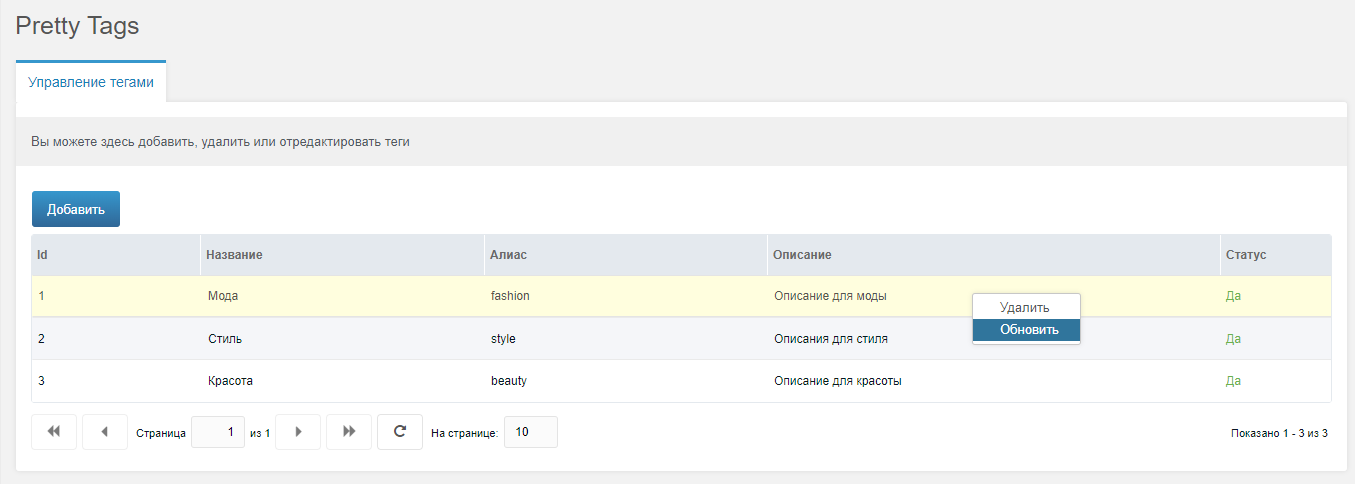
Tag management page.
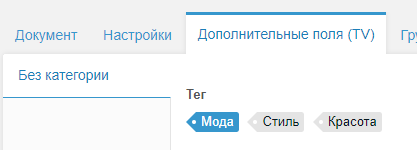
TV-field.
Connecting tags to the site
After installing the component, you must:
Create a resource that will catch tags and specify its id in the system setting: prettytags_resource_id
Important: In this resource, uncheck “Cached” to avoid problems.
Create a TV box for resources that need tags, with the prettytagstv type
Работа со страницей тегов.
Все теги будут отлавливаться на этой странице, в формате:
In a template, you can immediately call placeholders:
To select resources by tag, through pdoResource, you can call it like this:
Displaying resource tags
There is also a prettyTagsResource snippet for displaying resource tags, simple output:
You can specify your tpl and design as required, all tag fields are also available.
More details with examples, as well as asking a question, you can here
Key benefits:
- Allows you to create dynamic beautiful url for tags. For example, site.com/tag/some-tag.
- There is a page for managing tags, where we specify: alias, title, description. You can add, remove, edit and disable tags.
- There is its own TV-field, into which all the added tags are loaded and you cannot accidentally add a new tag, which is convenient when working with content managers, disabled tags are also not shown
- There is a custom tag cloud snippet that can be easily customized.
- The page with the tag output immediately receives all the fields, where we can easily output them and use with other components
- You can change the names and other fields of tags without losing anything in the resources.
- Much better performance compared to TV «Auto-tag», since tags are collected not from every resource, but from one entity
Component overview
Tag management page.
TV-field.
Connecting tags to the site
After installing the component, you must:
Create a resource that will catch tags and specify its id in the system setting: prettytags_resource_id
Important: In this resource, uncheck “Cached” to avoid problems.
Create a TV box for resources that need tags, with the prettytagstv type
Работа со страницей тегов.
Все теги будут отлавливаться на этой странице, в формате:
https://yoursite.ru/url-tags-page/tag-aliasIn a template, you can immediately call placeholders:
[[+pretty_tags_id]]
[[+pretty_tags_alias]]
[[+pretty_tags_name]]
[[+pretty_tags_description]]
To select resources by tag, through pdoResource, you can call it like this:
[[!pdoResources?
      &parents=`3`
      &includeTVs=`tags`
      &tpl=`@INLINE <p>[[+pagetitle]]</p>`
      &where=`{ "tags:LIKE":"%[[+pretty_tags_id]]%" }`
]]
Displaying resource tags
There is also a prettyTagsResource snippet for displaying resource tags, simple output:
[[!prettyTagsResource?
    &limit=`0`
    &input=`[[*tags]]`
]]
You can specify your tpl and design as required, all tag fields are also available.
More details with examples, as well as asking a question, you can here
1.0.0-pl
- First release
1.0.1-pl
- fix for correct work with tags page with '/' in the end
- add system setting for check isset tag, if on and tag not found - redirect to 404 page..
1.0.2-pl
- sort by name in resources for tags
- auto alias for creating tag with translit and replaced spaces
1.0.3-pl
- add [[+count]] param for prettyTagsCloud tpl
- add params for prettyTagsCloud snippet: tvId (required), includeUnpublished, includeDeleted
1.0.4-pl
- fix prettyTagsCloud snippet for deleted tags