

41.55
49.86
3490
per site
- Checked by Modstore
- Free future updates
- Work on the test and public domain
- 12 months tech. support

The author
Баха
Packages
6 Downloads
1 596
Usually answers within 2 hours


Version
1.0.0-pl
Release date
09.23.2026
Downloads
0
Views
72
The usual way to add a cookie banner: grab a script, drop it into the template, write «We use
cookies» — and leave the tracker code exactly where it was. The visitor clicks «Reject», and by
then the session recorder has already watched them do it. The banner exists on paper; in
practice it is decoration.
EasyCookies moves the trackers out of the template and into the banner's profile. From there the
banner decides when to run them: allow analytics and Metrica starts, refuse and its cookies are
removed. It is built on CookieConsent by Orest Bida, so
the looks, the accessibility and the mobile behaviour are already sorted.
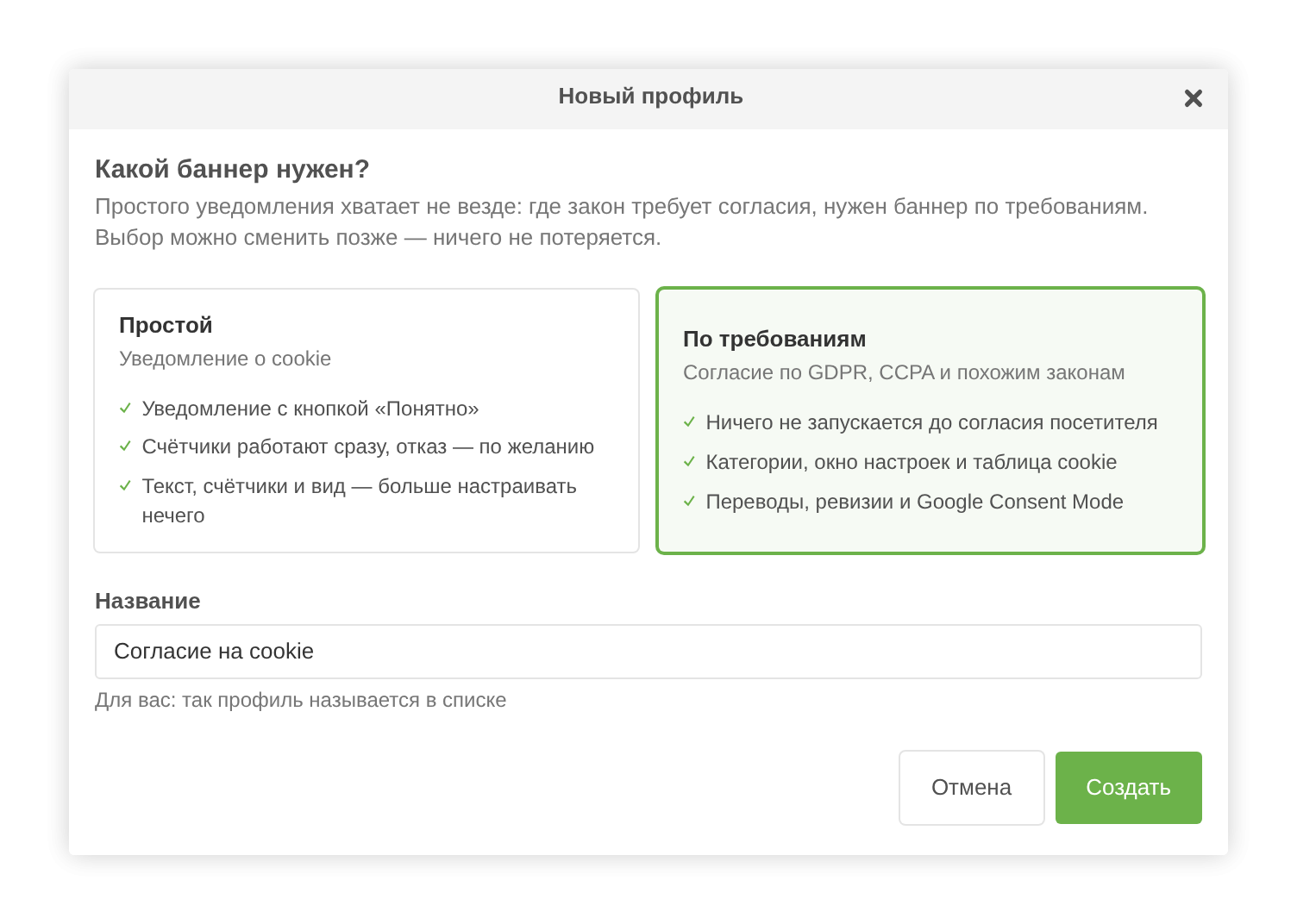
When you create a profile, the component asks which one you need.
Simple. A cookie notice with a «Got it» button and an optional «Reject». Trackers run
immediately. The form holds only the copy, the trackers and the layout.
Compliance. Nothing runs before consent: categories, a preferences modal with a cookie
table, any set of languages with their own copy, revisions and Google Consent Mode v2.
The choice is not final: one button switches the type and nothing you configured is lost.
Which banner a given site needs is decided by the laws that apply to it. EasyCookies is a tool,
not legal advice.
Google Analytics, Google Tag Manager, Meta Pixel, Yandex Metrica (with the session recorder), VK
Ads, and a custom-code slot for everything else. In a compliance banner each service belongs to
a category — analytics, marketing, functionality — its cookies are listed in the preferences
modal, and they are deleted when the visitor says no.
_ym_isad and _ym_visorc are removed.
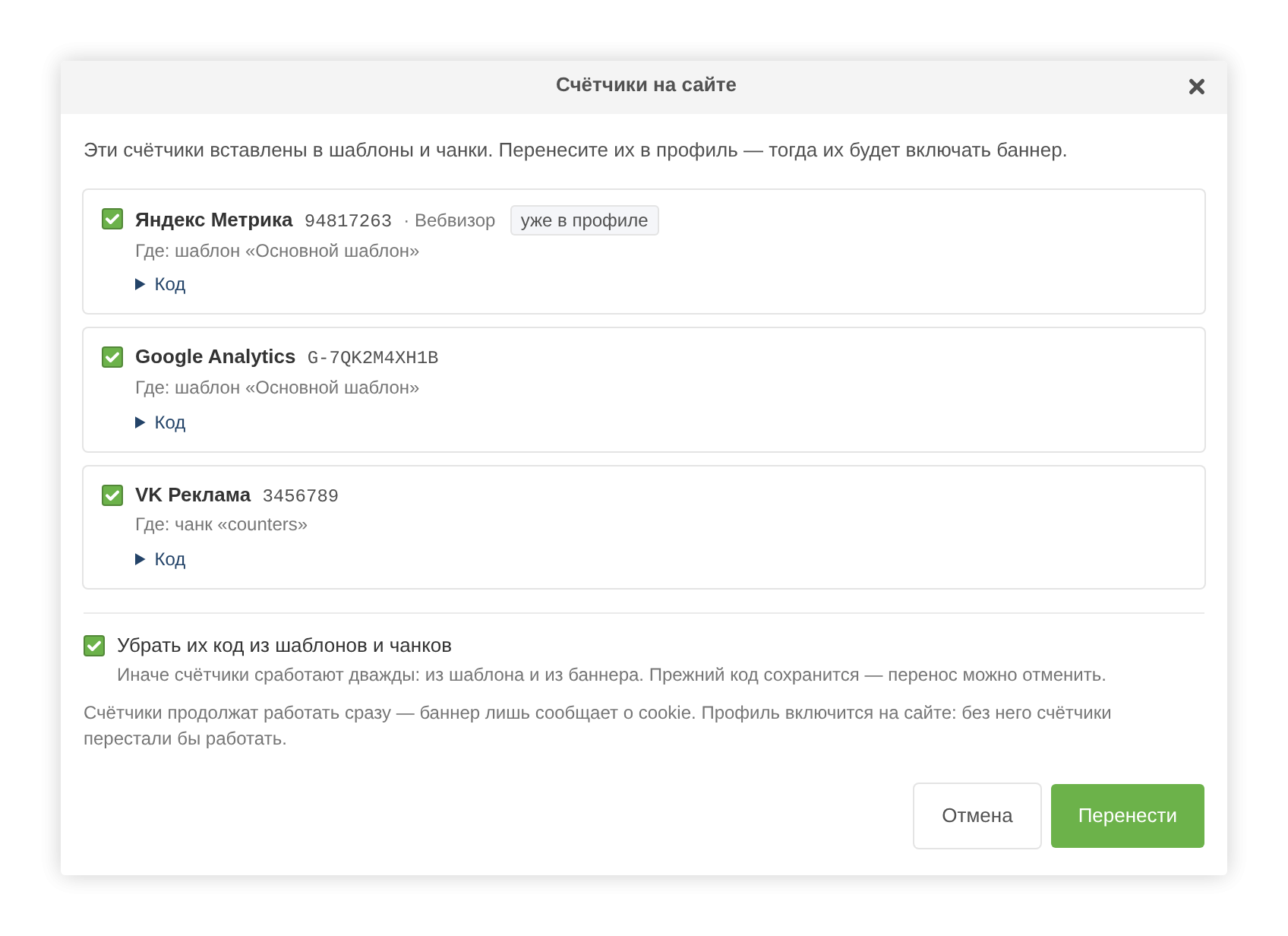
On a live site the trackers are already in the template, and often in three different chunks.
«Find on site» searches templates and chunks for their code — both in the database and in
.tpl and .html files — reads out the counter numbers and moves them into the profile.
Tick «Remove their code» and the found `and ` blocks are cut out along with their marker
comments; otherwise the tracker would fire twice. A block that contains anything besides the
tracker is left alone. The previous content of every element is backed up, and «Restore code»
puts it back.
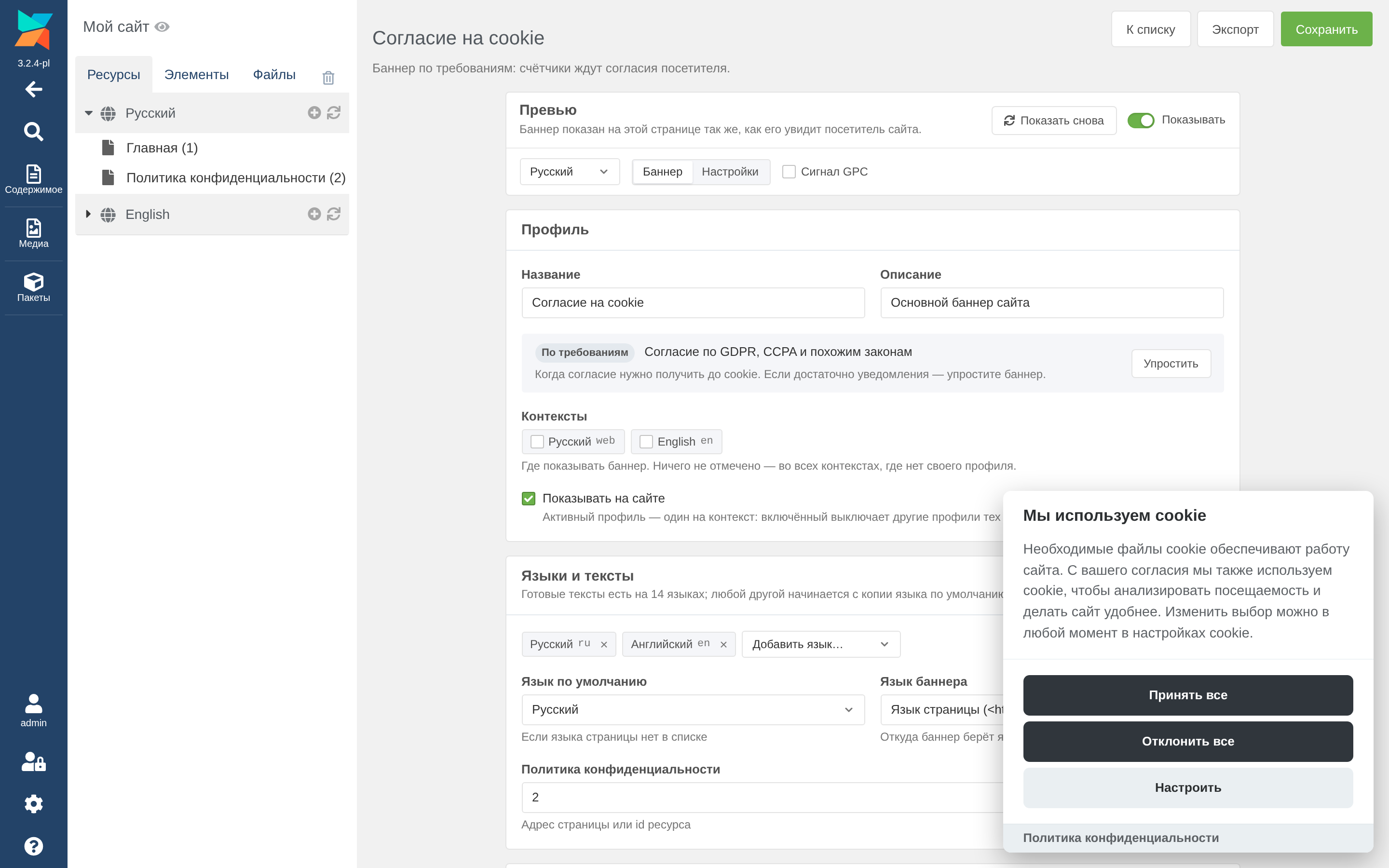
The banner is rendered right on the manager page, at the edge of the window where it will sit on
the site, and it updates as you type. It runs the very same script the site runs, so the preview
matches the result. So it never covers the form, the editor page shifts away from it: every
field stays reachable.
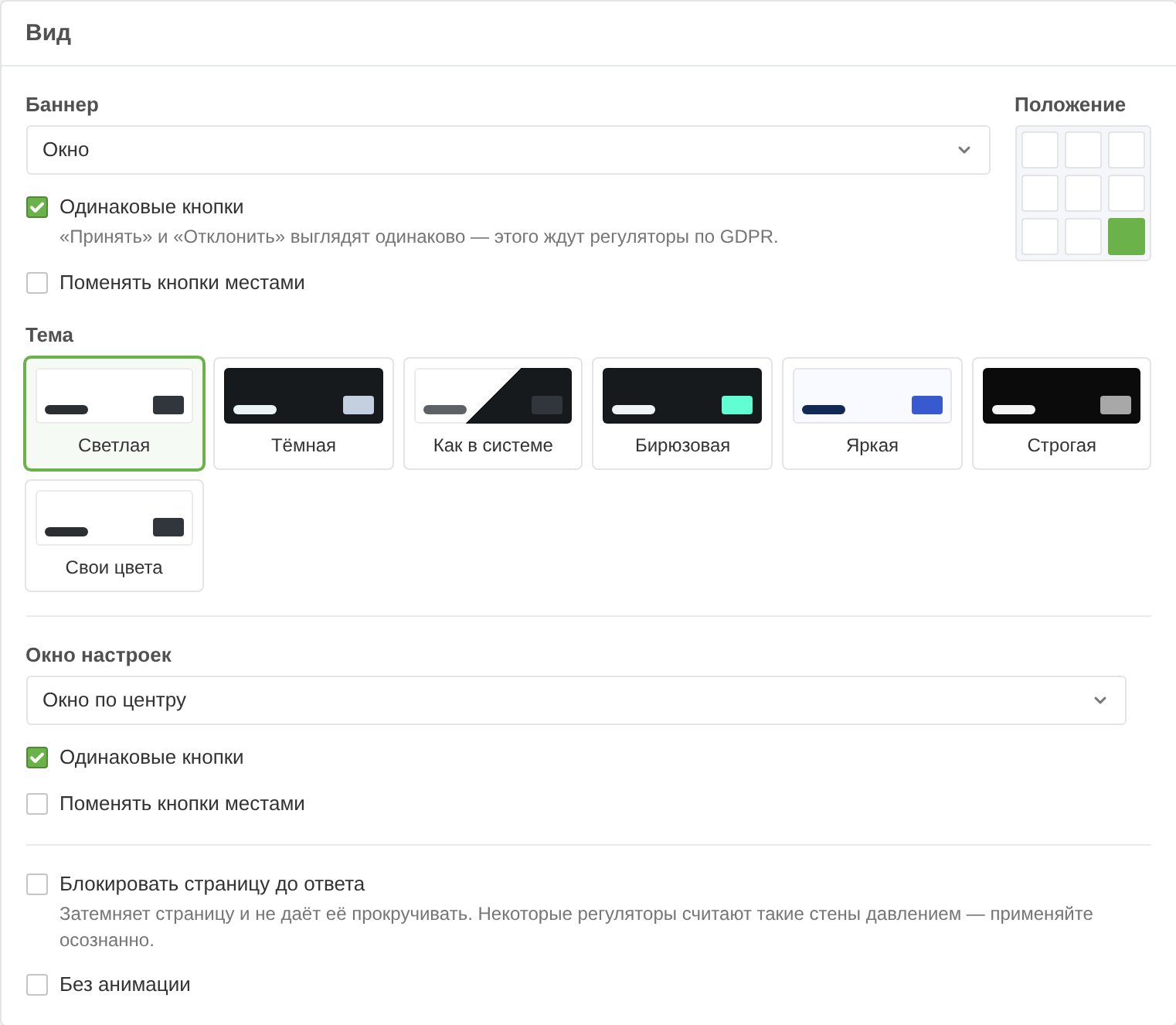
Layout follows the CookieConsent playground: box, cloud or bar, nine positions, a preferences
modal in the centre or on the side, themes and custom colours.
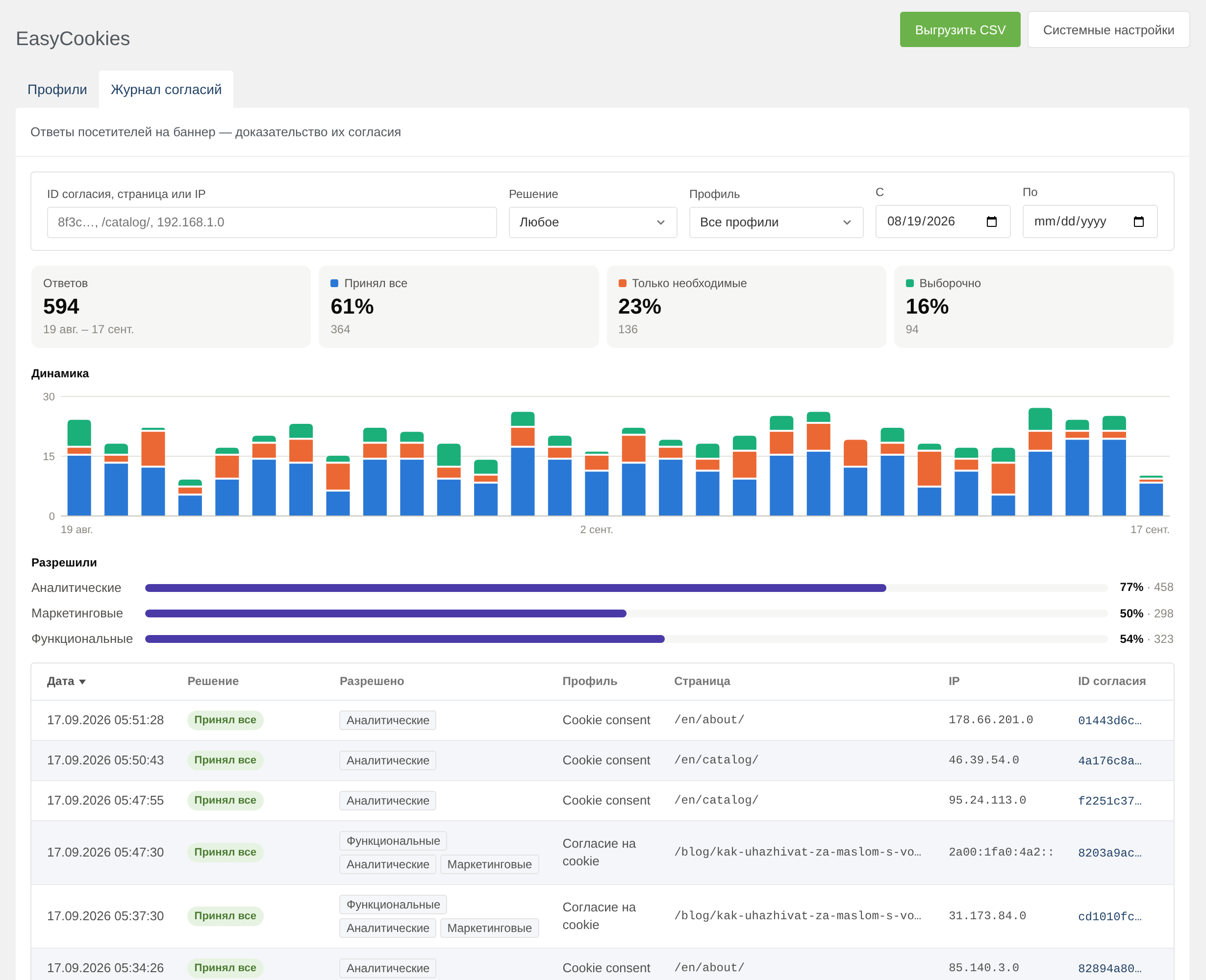
The GDPR asks you not only to collect consent but to prove it. A compliance banner records every
answer — the first one and every later change: the decision, the allowed categories and
services, the profile, the revision, the language, the page, a truncated IP and the user agent.
The consent ID matches the one stored in the visitor's cookie, so it leads to that visitor's
whole history.
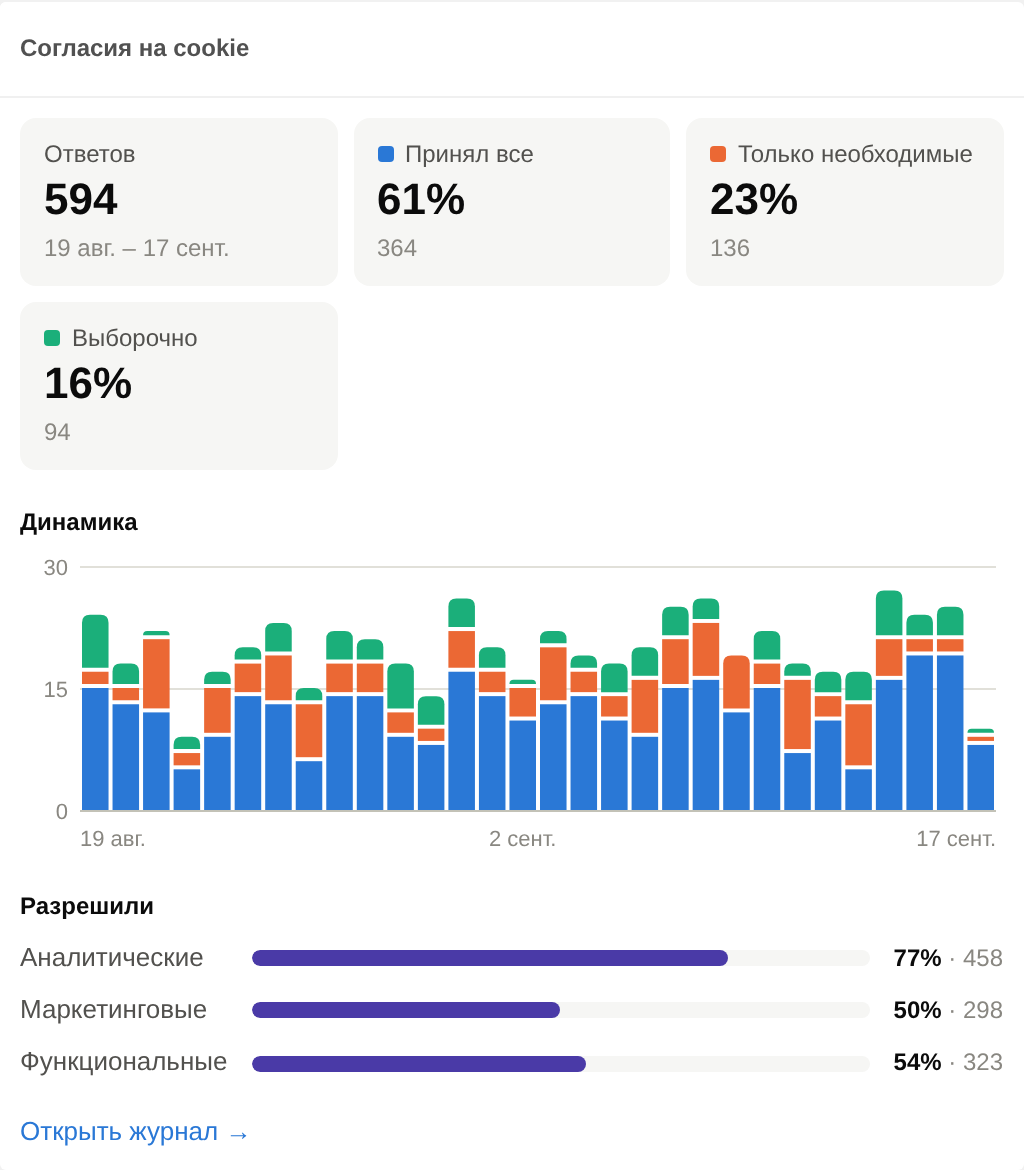
On top there is a summary for the period with a daily chart: how many answers, how many accepted
everything, rejected, or picked for themselves. Below are filters and the table; everything
under the filters exports to CSV. Old entries are deleted automatically, by default after a
year. Writing a consent record sets no cookies of its own.
Several banners on one site, one active per context: language versions and subdomains can each
have their own. Duplicate a profile to try changes without touching the site. Export and import
as JSON to carry a profile to another site.
Consent gates more than trackers — embedded video, maps, a reCAPTCHA form. The
EasyCookiesAllowed snippet renders a block only for visitors who allowed the category:
disappears at once.
Consent signals are placed right after `` — ahead of any Google tag, including ones pasted into
the template by hand — and the banner updates them once the visitor answers. For a returning
visitor the signals are correct from the first line.
Browsers sending a GPC signal («do not sell or share my data» — Firefox, Brave, DuckDuckGo) get
no marketing services, and see an explanation in the preferences modal. The CCPA requires this.
A plugin renders the active profile's banner on every HTML page — nothing goes into the
template. Individual pages can be excluded via a system setting. If you want to choose the spot
yourself, call the [[EasyCookies]] snippet.
Put the «change your mind» link in the site footer:
accepted('analytics').
Ready-made copy in 14 languages: English, Russian, Ukrainian, Belarusian, Kazakh, Uzbek, Tajik,
Armenian, Azerbaijani, German, French, Spanish, Italian, Polish. The banner speaks the language
of the page, and falls back to the profile's default language.
The component page looks like a native part of the manager in both MODX 3 and MODX 2: the same
tabs, buttons, windows, notifications and colours. No ExtJS in the interface. Lexicons: English,
Russian, Tajik. Plus a «Cookie consents» dashboard widget.
cookies» — and leave the tracker code exactly where it was. The visitor clicks «Reject», and by
then the session recorder has already watched them do it. The banner exists on paper; in
practice it is decoration.
EasyCookies moves the trackers out of the template and into the banner's profile. From there the
banner decides when to run them: allow analytics and Metrica starts, refuse and its cookies are
removed. It is built on CookieConsent by Orest Bida, so
the looks, the accessibility and the mobile behaviour are already sorted.
Simple banner or compliance banner
When you create a profile, the component asks which one you need.
Simple. A cookie notice with a «Got it» button and an optional «Reject». Trackers run
immediately. The form holds only the copy, the trackers and the layout.
Compliance. Nothing runs before consent: categories, a preferences modal with a cookie
table, any set of languages with their own copy, revisions and Google Consent Mode v2.
The choice is not final: one button switches the type and nothing you configured is lost.
Which banner a given site needs is decided by the laws that apply to it. EasyCookies is a tool,
not legal advice.
Trackers live in the banner, not in the template
Google Analytics, Google Tag Manager, Meta Pixel, Yandex Metrica (with the session recorder), VK
Ads, and a custom-code slot for everything else. In a compliance banner each service belongs to
a category — analytics, marketing, functionality — its cookies are listed in the preferences
modal, and they are deleted when the visitor says no.
_ym_isad and _ym_visorc are removed.
- Google Analytics — the G-XXXXXXXXXX id; _ga and _ga_* are removed on refusal.
- Google Tag Manager — the GTM-XXXXXXX id.
- Meta Pixel — the pixel id; _fbp is removed.
- Yandex Metrica — the counter number and the session recorder; _ym_uid, _ym_d,
- VK Ads — the pixel id; tmr_lvid, tmr_lvidTS and tmr_detect are removed.
- Custom code — any tags, and you list the cookies to clear behind them.
Move trackers out of templates with one button
On a live site the trackers are already in the template, and often in three different chunks.
«Find on site» searches templates and chunks for their code — both in the database and in
.tpl and .html files — reads out the counter numbers and moves them into the profile.
Tick «Remove their code» and the found `and ` blocks are cut out along with their marker
comments; otherwise the tracker would fire twice. A block that contains anything besides the
tracker is left alone. The previous content of every element is backed up, and «Restore code»
puts it back.
A preview that tells the truth
The banner is rendered right on the manager page, at the edge of the window where it will sit on
the site, and it updates as you type. It runs the very same script the site runs, so the preview
matches the result. So it never covers the form, the editor page shifts away from it: every
field stays reachable.
Layout follows the CookieConsent playground: box, cloud or bar, nine positions, a preferences
modal in the centre or on the side, themes and custom colours.
Consent log
The GDPR asks you not only to collect consent but to prove it. A compliance banner records every
answer — the first one and every later change: the decision, the allowed categories and
services, the profile, the revision, the language, the page, a truncated IP and the user agent.
The consent ID matches the one stored in the visitor's cookie, so it leads to that visitor's
whole history.
On top there is a summary for the period with a daily chart: how many answers, how many accepted
everything, rejected, or picked for themselves. Below are filters and the table; everything
under the filters exports to CSV. Old entries are deleted automatically, by default after a
year. Writing a consent record sets no cookies of its own.
Profiles and contexts
Several banners on one site, one active per context: language versions and subdomains can each
have their own. Duplicate a profile to try changes without touching the site. Export and import
as JSON to carry a profile to another site.
Server-side consent checks
Consent gates more than trackers — embedded video, maps, a reCAPTCHA form. The
EasyCookiesAllowed snippet renders a block only for visitors who allowed the category:
[[!EasyCookiesAllowed? &category=`marketing` &tpl=`youtube` &tplElse=`youtube.stub`]]When the visitor changes their mind, the banner reloads such a page and the block appears or
disappears at once.
Google Consent Mode v2 and Global Privacy Control
Consent signals are placed right after `` — ahead of any Google tag, including ones pasted into
the template by hand — and the banner updates them once the visitor answers. For a returning
visitor the signals are correct from the first line.
Browsers sending a GPC signal («do not sell or share my data» — Firefox, Brave, DuckDuckGo) get
no marketing services, and see an explanation in the preferences modal. The CCPA requires this.
Output on the site
A plugin renders the active profile's banner on every HTML page — nothing goes into the
template. Individual pages can be excluded via a system setting. If you want to choose the spot
yourself, call the [[EasyCookies]] snippet.
Put the «change your mind» link in the site footer:
<a href="#" data-cc="show-preferencesModal">Cookie settings</a>For your own scripts the page exposes window.EasyCookies: show(), showPreferences(),
accepted('analytics').
Languages
Ready-made copy in 14 languages: English, Russian, Ukrainian, Belarusian, Kazakh, Uzbek, Tajik,
Armenian, Azerbaijani, German, French, Spanish, Italian, Polish. The banner speaks the language
of the page, and falls back to the profile's default language.
Interface
The component page looks like a native part of the manager in both MODX 3 and MODX 2: the same
tabs, buttons, windows, notifications and colours. No ExtJS in the interface. Lexicons: English,
Russian, Tajik. Plus a «Cookie consents» dashboard widget.
1.0.0-pl
- First release.
- Profiles: several banners on one site, one active; copy a profile to try changes without touching the site.
- Simple banner: a cookie notice with an "OK" button and an optional "Decline"; counters work right away.
- Compliant banner: consent before cookies (GDPR, CCPA and similar laws), categories, a preferences window with a cookie table, revisions to ask everyone again, Google Consent Mode v2.
- Yandex Metrica, Google Analytics, Google Tag Manager, VK Ads, Meta Pixel and custom code are switched on by the banner; their cookies are removed when the visitor refuses.
- The settings of a profile are one JSON; the CookieConsent config is built from it by src/core/build.ts, shared by the manager and the site, so the preview never drifts from the site.
- Ready banner texts in 14 languages: Russian, English, Ukrainian, Belarusian, Kazakh, Uzbek, Tajik, Armenian, Azerbaijani, German, French, Spanish, Italian, Polish. Any other language by its code.
- Layouts, positions and themes of the CookieConsent playground, own colours, and a live preview right on the manager page.
- The plugin puts the banner on every HTML page; the EasyCookies snippet outputs it by hand; the easycookies.exclude_resources setting skips pages.
- The banner loader is a Vite build of its own (vite.web.config.ts): an IIFE file and CSS for a plain .
- Consent log: every answer to a compliant banner is recorded with its consent ID, decision, categories, page and a shortened IP. A tab with a summary for the period, filters and CSV export. Old entries are removed after easycookies.log_days; easycookies.log_ip turns storing the IP off.
- "Find on the site" moves counters pasted into templates and chunks — in the database and in .tpl and .html files (core/elements/ and easycookies.migrate_paths) — into the profile and can remove their code from there; the move can be undone.
- Global Privacy Control, on or off per profile: a browser sending the GPC signal gets no marketing services and a note in the preferences window.
- EasyCookiesAllowed snippet: output a block only if the visitor allowed a category or service; the page reloads when the choice changes.
- Profiles by context: one active profile per context, for language versions and subdomains.
- Profile export to a JSON file and import from it.
- The profile list shows each profile's contexts and the number of consents recorded for it, with a link to the log filtered by the profile.
- Consent log summary with cards, a chart of answers by day and the share of each category — on the log tab for the chosen filters and in the "Cookie consents" dashboard widget for the last 30 days.
- The revision block in the editor shows only for a saved profile: a new one has not asked anyone for consent yet.
- Besides the 14 languages with ready texts, a profile can take any language MODX is translated into, straight from the list.
- Tables sort by their columns: a click on a header sorts by it, a second click reverses the order, and the active column carries an arrow. Profiles sort by name, number of consents and date changed (date created for the ones never changed); the log by date, decision, profile (by name), page, IP and ID. The server does the sorting, so the order is the same across every page of the list; the columns that come from the profile settings JSON — layout, services, languages — do not sort.
- A right click on a profile row opens the same menu as the "⋯" button, like the context menu of a MODX grid.
- Build: run as root, build.php hands core/packages/ and the MODX cache (core/cache/) over to the owner of the directory — otherwise the manager could not write the lexicon cache and was left with keys instead of labels.
- Manager interface in English, Russian and Tajik.