

11.79
14.14
990
per site
- Checked by Modstore
- Free future updates
- Work on the test and public domain
- 12 months tech. support

The author
Баха
Packages
6 Downloads
1 596
Usually answers within 2 hours


Version
1.0.0-pl
Release date
09.25.2026
Downloads
0
Views
63
How this usually goes: open RealFaviconGenerator, upload the logo, tune it, download the archive, unpack it, upload it over FTP, copy a dozen tags into the template — and then fix site.webmanifest, because it says MyWebSite instead of the site's name. Six months later the client asks for a holiday favicon and you do it all again. And once the holidays are over, again, backwards.
EasyFavicon does it from the manager:
1. Pick an image in the MODX media browser.
2. Tune the favicon in RealFaviconGenerator's own editor.
3. Come back to MODX — the files are already in the site directory, the manifest is filled in with the site's data, and the markup sits in <head> on every page.
No archives, no FTP, no copying tags.
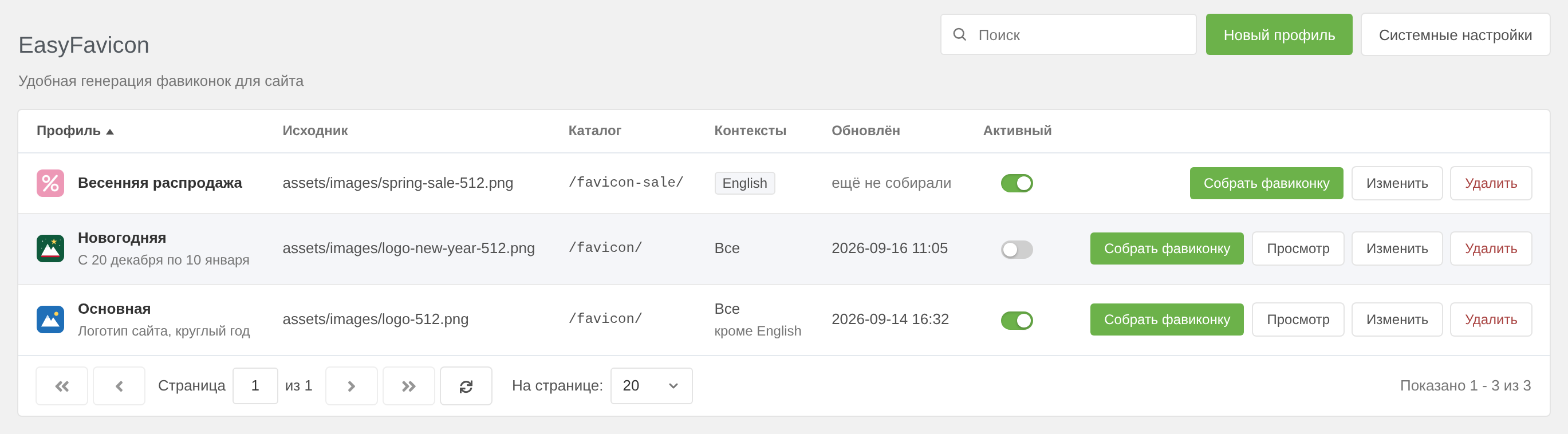
No home-made icon builder: you work in the RealFaviconGenerator editor with all of its options — tile colour, padding, corners, theme — press Generate, and the browser returns you to the manager with the finished set. The component downloads the archive, unpacks it into the profile's directory and stores the markup.
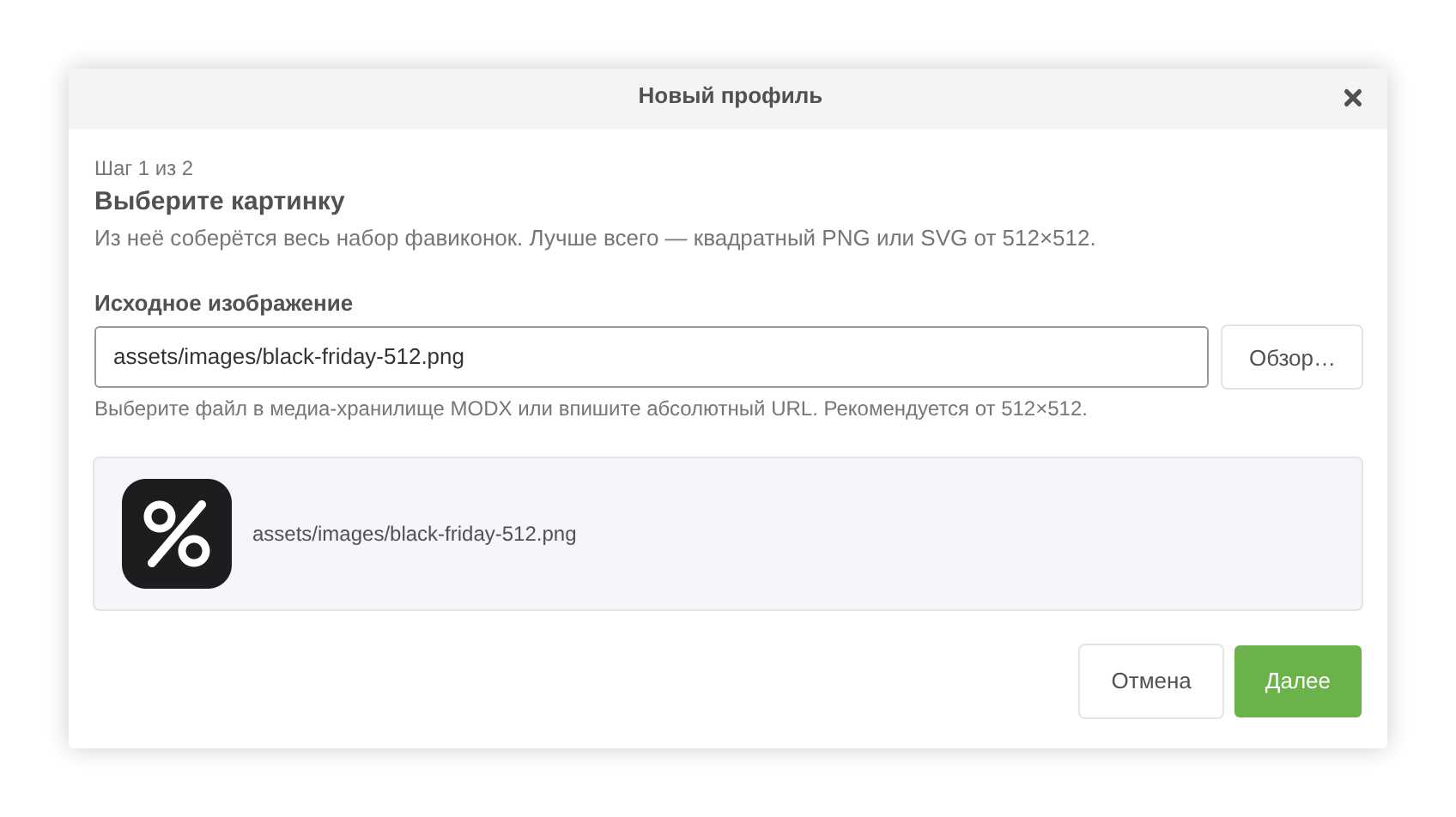
Several sets on one site, one of them active. The archive of every build is kept, so switching profiles restores both the markup and the files. Main, holiday, sale — switched with a toggle in the list, with nothing to rebuild.

A language version or a subdomain can have its own favicon: tick the contexts on a profile and it is served there, while the rest get the general profile with no contexts.
RealFaviconGenerator names its files identically, so the component makes sure active profiles of different contexts never share a directory and overwrite each other's icons: activating a profile in a directory that is already taken is refused, and EasyFavicon names the conflicting profile.
RealFaviconGenerator ships site.webmanifest with its own placeholders ("name": "MyWebSite", "short_name": "MySite") and no start_url — the API gives no way to pass an application name.
So after unpacking, EasyFavicon completes the manifest: name and short_name from site_name, start_url and id from base_url, lang from cultureKey. Only empty fields and the service's placeholders are filled — anything you typed in the editor is left untouched. The profile's stored archive keeps the service's original file.
A plugin inserts the active profile's markup before </head> — templates stay untouched. If you would rather choose the spot, turn auto-injection off and call the snippet:
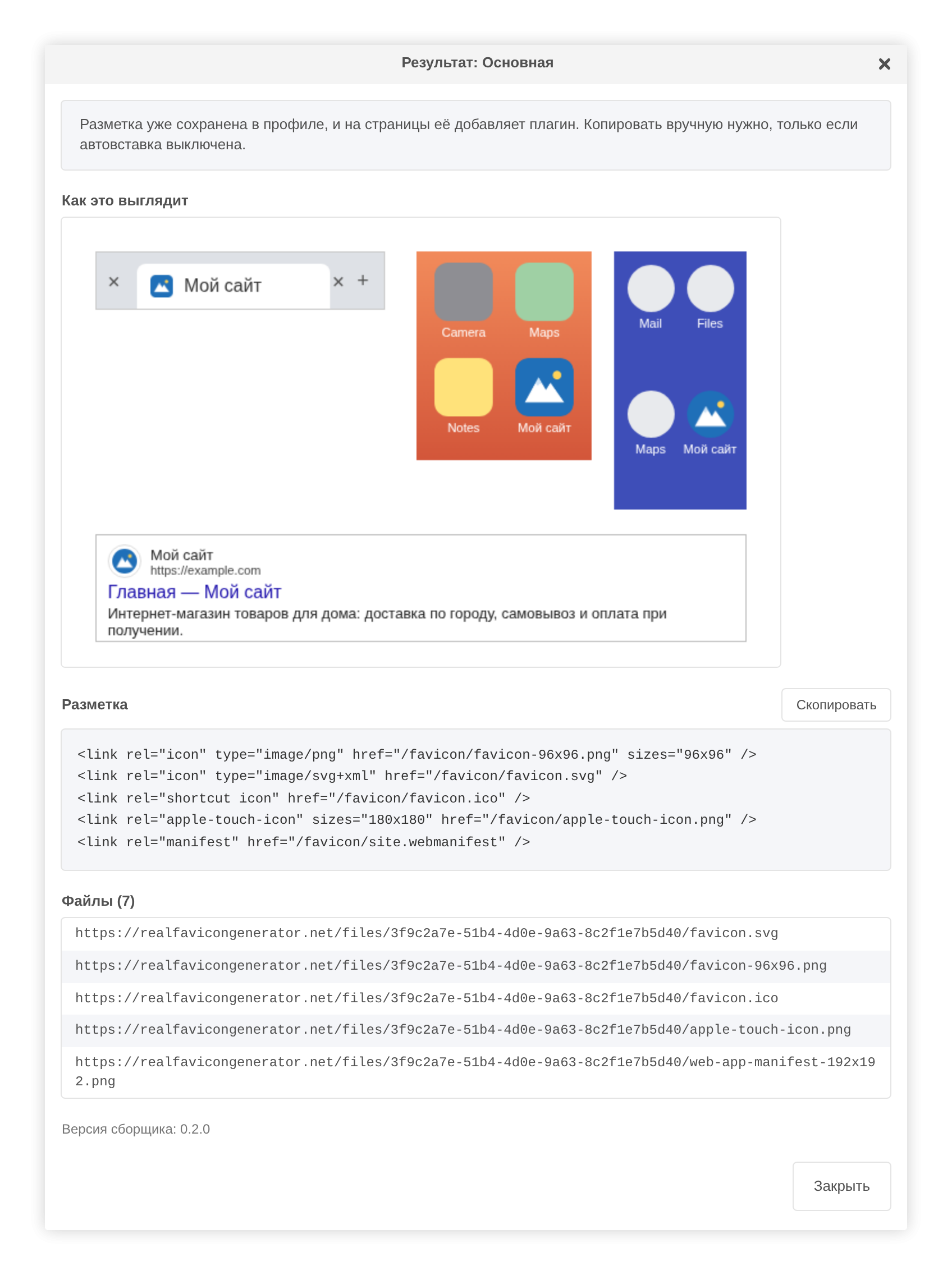
After a build you can see how the icon looks in browsers and on mobile, what markup went onto the pages and which files landed in the directory.
The component unpacks an archive into a public directory of the site, so:
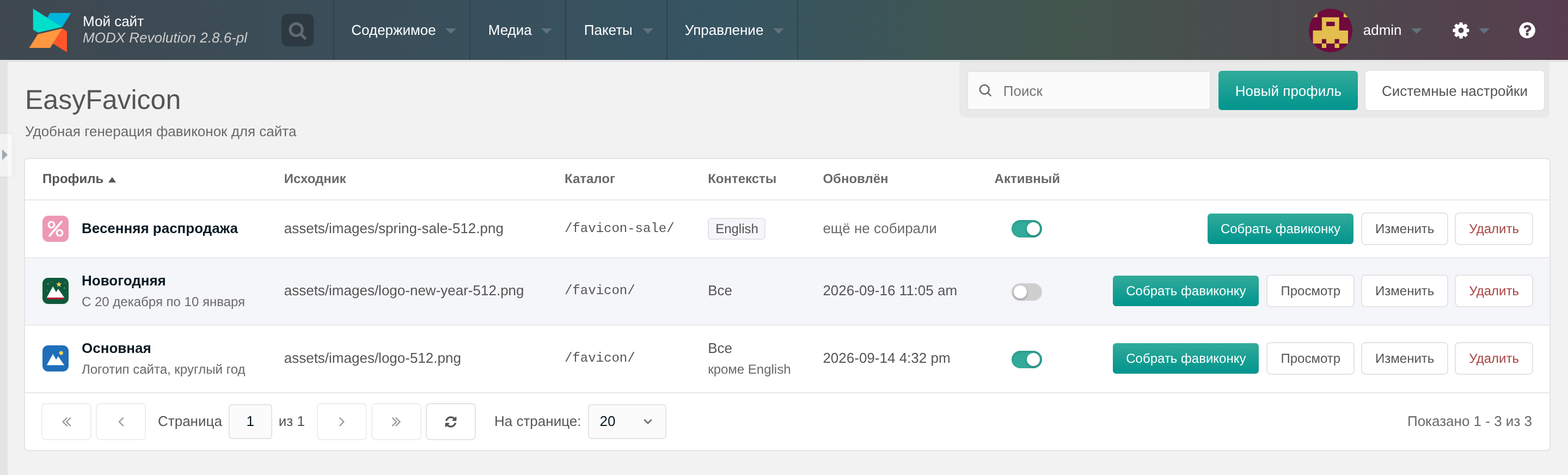
The component page looks like a native part of the manager in both MODX 3 and MODX 2: the same buttons, windows, notifications and confirmations. The list has search, column sorting and a right-click action menu, just like MODX grids. No ExtJS in the interface.
EasyFavicon works through RealFaviconGenerator's interactive API, so a key is mandatory. It is free: get it at realfavicongenerator.net/api and put it into the easyfavicon.api_key system setting. The «System settings» button on the component page opens that section already filtered.
EasyFavicon is an independent product. It is not affiliated with, endorsed by or supported by RealFaviconGenerator.net; the service is named only to say where the component sends its requests. Use of the service is subject to its own terms.
EasyFavicon does it from the manager:
1. Pick an image in the MODX media browser.
2. Tune the favicon in RealFaviconGenerator's own editor.
3. Come back to MODX — the files are already in the site directory, the manifest is filled in with the site's data, and the markup sits in <head> on every page.
No archives, no FTP, no copying tags.
Built in the service's own editor
No home-made icon builder: you work in the RealFaviconGenerator editor with all of its options — tile colour, padding, corners, theme — press Generate, and the browser returns you to the manager with the finished set. The component downloads the archive, unpacks it into the profile's directory and stores the markup.
Profiles: a holiday favicon in one click
Several sets on one site, one of them active. The archive of every build is kept, so switching profiles restores both the markup and the files. Main, holiday, sale — switched with a toggle in the list, with nothing to rebuild.
Contexts
A language version or a subdomain can have its own favicon: tick the contexts on a profile and it is served there, while the rest get the general profile with no contexts.
RealFaviconGenerator names its files identically, so the component makes sure active profiles of different contexts never share a directory and overwrite each other's icons: activating a profile in a directory that is already taken is refused, and EasyFavicon names the conflicting profile.
The manifest is filled in with the site's data
RealFaviconGenerator ships site.webmanifest with its own placeholders ("name": "MyWebSite", "short_name": "MySite") and no start_url — the API gives no way to pass an application name.
So after unpacking, EasyFavicon completes the manifest: name and short_name from site_name, start_url and id from base_url, lang from cultureKey. Only empty fields and the service's placeholders are filled — anything you typed in the editor is left untouched. The profile's stored archive keeps the service's original file.
Auto-injection or a snippet
A plugin inserts the active profile's markup before </head> — templates stay untouched. If you would rather choose the spot, turn auto-injection off and call the snippet:
[[EasyFavicon]]
[[EasyFavicon? &profile=`Holiday`]]
Paths respect base_url, so a site in a subdirectory is not a problem either. Links carry a build stamp, so nobody is left staring at a cached old icon after a profile switch.
See the result
After a build you can see how the icon looks in browsers and on mobile, what markup went onto the pages and which files landed in the directory.
Security
The component unpacks an archive into a public directory of the site, so:
- you can only return from the editor into the manager session that started the build;
- downloads are accepted only from realfavicongenerator.net;
- only favicon files leave the archive: png, ico, svg, webmanifest and friends;
- the page and every processor require the settings permission.
Interface
The component page looks like a native part of the manager in both MODX 3 and MODX 2: the same buttons, windows, notifications and confirmations. The list has search, column sorting and a right-click action menu, just like MODX grids. No ExtJS in the interface.
A free RealFaviconGenerator API key is required
EasyFavicon works through RealFaviconGenerator's interactive API, so a key is mandatory. It is free: get it at realfavicongenerator.net/api and put it into the easyfavicon.api_key system setting. The «System settings» button on the component page opens that section already filtered.
EasyFavicon is an independent product. It is not affiliated with, endorsed by or supported by RealFaviconGenerator.net; the service is named only to say where the component sends its requests. Use of the service is subject to its own terms.
1.0.0-pl
- Contexts on a profile: one active profile per context, and a profile with contexts ticked outranks a profile without them, which serves every remaining context. Switching a profile on switches off the active profiles of the same contexts; the plugin and the snippet take the active profile of the page context.
- Active profiles of different contexts no longer share a directory: favicon file names are the same, so the sets would overwrite each other. Switching a profile into a taken directory is refused and names the profile holding it.
- The row switch now also switches the active profile off, not only on.
- The profile table sorts by the Profile, Master picture, Directory and Updated columns: a click on a header sorts by it, a second click reverses the order, and the active column carries an arrow. The server does the sorting, so the order is the same across every page of the list.
- A right click on a profile row opens a menu with its actions — Build, Check, Edit, Remove — like the context menu of a MODX grid. Input fields keep the browser's own menu.
- Buttons react to hover like the manager's: in MODX 3 only the background fades, in MODX 2 the change is instant.
- Rows of the profile list are no longer highlighted on hover, like the grids of the manager.
- The pager icons and the close button of a window stay centred at any browser zoom.
- Escape closes windows again.
- Tajik translation (tg): the interface, errors and system settings.
- The release package is built on MODX 2.8.6 with the comments stripped from its PHP and its contents encrypted with a modstore.pro key — the files of the component too, not only the elements. Without a purchase for the site the package does not install, and there is no plain PHP in the archive. The release carries the archive together with the notes from the commit history.
- Removed rebuilding without the editor: RealFaviconGenerator lists its non-interactive API as not available. Gone with it: the generate processor, the design, settings and non_interactive_request profile fields, the JSON editors, and the api_url, compression and scaling_algorithm settings.
- Development mode is no longer a system setting: dev_mode and dev_url are not installed any more; only the EASYFAVICON_DEV_URL environment variable of the dev stack turns it on. When the dev server does not answer, the built bundle is loaded instead of a blank page.
- The manager UI config is printed with JSON_HEX_TAG, so "" in a callback message or a path no longer closes the script tag.
- Security: the return from the RealFaviconGenerator editor is accepted only with a one-time token the interactive processor keeps in the session and sends in custom_parameter together with the profile id. A crafted callback link could make an administrator install a package from any address. json_result from the query string is no longer accepted; json_result_url and package_url must be https on realfavicongenerator.net.
- Security: only favicon files (png, ico, svg, webmanifest, xml, json) with plain names are unpacked into the site; other types, double extensions and paths with ".." are skipped and logged, and a files path with ".." is refused.
- Security: the HTTP client only speaks http and https, redirects included.
- Security: the page, the menu item and every processor require the settings permission. The callback also used to run before the permission check.
- Security: a master picture on disk must be an image (PNG, JPG, GIF, WebP, SVG, content checked) inside the site root and outside core/. The profile field could previously send any file, core/config/config.inc.php included, to the browser. The error no longer shows the absolute path.
- Stored profile archives and thumbnails live outside the component directories, in core/packages/easyfavicon/ and assets/easyfavicon/thumbs/. Inside core/components/easyfavicon/ and assets/components/easyfavicon/ they were deleted together with the package on uninstall and, on the dev stack, packed into the transport package. Existing files are not moved.
- Build: when run as root, the builder hands the package archive and its unpacked directory in core/packages/ over to the owner of that directory, so the manager can remove or reinstall the package. A missing _build/resolvers/ directory no longer breaks the build.
- Removed _build/resolvers/_symlinks.php: the builder never picked it up, and when run it deleted the source directories under Extras/easyfavicon/.
- The build date in the profile list follows the manager's manager_date_format and manager_time_format instead of a fixed Y-m-d H:i.
- When the bundle file cannot be found, its URL is versioned with the Extra's version instead of nothing, so browsers do not keep stale css and js after an update.
- The profile list shows the answer to the latest request: a slow reply for "a" could arrive after the one for "ab" and overwrite its results, and the same happened when paging quickly.
- "View" reports a server error instead of opening an empty markup panel.
- Copying the markup works in a manager served over http, where the Clipboard API is missing: the text is copied through a selection instead.
- Buttons and fields follow the manager: buttons are 36px like .x-btn (28px in the table row, 42px in a modal's button bar and 44px in MODX 2, the pager keeps its measured 32px) with a #ccc hover ring (in MODX 2 a plain button turns #3697cd blue on hover and focus and #2d86b7 when pressed, like .x-btn-over and .x-btn-click), and a disabled button, the MODX 2 gradient one included, no longer reacts to hover and press. Fields and selects share one class like .x-form-text: a #e4e4e4 border, #ccc on hover, #999 on focus (#2d86b7 on #fbfbfb in MODX 2).
- A "System Settings" button next to "New profile" and a link in the missing API key notice open System Settings filtered to EasyFavicon (?a=system/settings&ns=easyfavicon&area=easyfavicon_main); the MODX 2 and 3 grids and EasySettings all apply the filter, and api_key comes first in the area.
- The keyboard focus ring is no longer covered by a black system ring, which MODX 3 draws with ".ext-webkit :focus-visible" and !important.
- The page title follows the manager: 20px #53595f in MODX 3, 25px #555 in MODX 2; modal headings are 550 in MODX 3 and bold in MODX 2.
- Search and "New profile" sit in an action container like #modx-action-buttons: at the right edge of the window, at its top in MODX 3, on a translucent plate hanging from the panel in MODX 2. The search field has an icon and a clear button, Escape clears it, and "/" and Ctrl+K focus it in any keyboard layout.
- Removing and building a profile are confirmed with the manager's own Ext.Msg.confirm window instead of the browser's confirm(), called exactly like MODx.msg.confirm in MODX 2 and 3: the core warning title and "Yes" and "No" buttons the manager translates itself. The profile name and directory in the text are escaped. The window closes right after "Yes"; the button in the table row shows the progress and the manager's own notices report the outcome and errors. "/" and Ctrl+K do nothing while the window is open.
- Modals look like manager windows (.x-window in MODX 3 and 2): a 50% white mask, 3px corners and a shadow, a 35px title bar with a centred 13px bold title and a round Font Awesome close tool, a white body with 15px padding and a button bar with right-aligned 42px buttons (44px in MODX 2). In MODX 2 the title and button bars are #f0f0f0 with a #dcdcdc line. A window zooms in from 0.7 in 0.25s like the manager's; no animation with prefers-reduced-motion.
- Modals are dialogs for screen readers (role="dialog", aria-modal, labelled by the title). Focus moves into the window on open and back to where it came from on close. Escape does not close a modal while an ExtJS window or list is open.
- Notices are the MODX manager's own instead of custom toasts. A success is a MODx.msg.status plate with one message, like the core's session_extended: 1.5s for a short phrase as in the core, longer by text length for the return from the RealFaviconGenerator editor with the profile name. A warning and an error are an Ext.Msg window with OK, the core warning or error title and the icon the manager styles itself, a yellow triangle or a red cross. They do not fit the status plate: in MODX 3 it is a green block with a check mark a quarter of the screen wide, and a long warning was squeezed into a narrow column that looked like a success. The text is escaped, so a profile name, a path or a server reply never turns into markup. A notice arriving while a question or another notice is open waits for its turn instead of replacing it. A return from the editor with a caveat shows only the caveat, which starts with "The set was built" anyway. "/" and Ctrl+K do nothing while the window is open, and focus goes back where it was after OK.
- When the list fails to load, its reason and a "Try again" button replace the table, which used to claim there were no profiles yet.
- While the next page or search results load, the previous rows stay in place and dim if the wait gets long.
- Form labels point at their fields, hints and errors are tied through aria-describedby, and field errors from the server show under the field; the wizard goes back to the picture step when the error is there.
- The profile table scrolls sideways on a narrow screen instead of being cut off.
- The MODX 2 palette follows the manager's 2.8.6 index.css: plain button text #555555 (it was #556c88, the tree's colour), link hover #297aa7.
- Errors from the core base processors of a profile (not specified, not found, not saved, not removed) show as text instead of the easyfavicon.profileerr key: the core builds it from the dotted objectType, and the lexicon had no such keys. Lexicon strings nothing uses any more are gone: the old grid's labels and actions (easyfaviconprofile), easyfavicon_intro_msg, easyfavicon_ui_active_badge, easyfavicon_ui_activate, easyfavicon_ui_superseded.
- Profile form field errors show under their fields again: the MODX connector sends them in data, while the UI looked in errors, so a duplicate name gave a generic "Request failed" window instead of "A profile with this name already exists" under the field.
1.0.0-beta2
- Interactive flow: hand the user over to the RealFaviconGenerator editor and take the result back through a callback.
- EasyFavicon plugin injects the markup into on OnWebPagePrerender; the snippet stays for manual placement.
- Master picture field opens the MODX media browser.
- New profile field non_interactive_request (the 0.2.0 service does not return it yet).
- New settings: interactive_url, auto_inject, auto_inject_profile.
- Manager UI restyled to the MODX palette; the row shows the favicon itself.
- All interface strings moved into the easyfaviconui* lexicons (EN/RU).
- Profile creation is now a two-step wizard; advanced fields moved behind a disclosure.
- An active switch right in the list row.
- Fixed: building an inactive profile replaced the live favicon.
- Interface strings go through the manager's global _() helper.
- Fixed: the browser kept the previous favicon after switching profiles (markup URLs are versioned now).
- Fixed: a non-writable package store failed silently.
- Every build is kept: the profile package is archived and redeployed when the profile is activated.
- site.webmanifest is filled in from the site after unpacking: the service ships MyWebSite/MySite placeholders and no start_url. Only blanks and placeholders are touched.
- New settings: manifest_name, manifest_short_name.
- Fixed: the MODX file browser could only be opened once per page load.
- Fixed: the busy spinner appeared on the wrong button.
- Fixed: the build date rendered as 1970-01-01.
1.0.0-beta1
- Initial release.
- RealFaviconGenerator API v1 integration.
- Svelte-based CMP with generation profiles.
- EasyFavicon snippet.
- MODX 2.4+ / MODX 3.x support.